
Overview
The Models Inventory report provides a comprehensive inventory of the AI models detected in your repositories. For each model, it shows where the model is used (application and project), who publishes it, its license information, and whether it is associated with risk factors or policy violations.
Use the report to understand which AI models your organization relies on, to support compliance and audit requirements, and to track model usage across teams and AI systems.
Getting it done
Prerequisites
-
Make sure your organization has access to Mend AI scanning.
-
Run an AI scan for the projects you want to include. The report is based on the latest completed scan of each project.
-
Make sure you have permission to create and download reports for the selected scope.
Create the Report via the Mend Platform
-
Go to Reports in the Mend Platform.
-
Click the + Create button on the right.

-
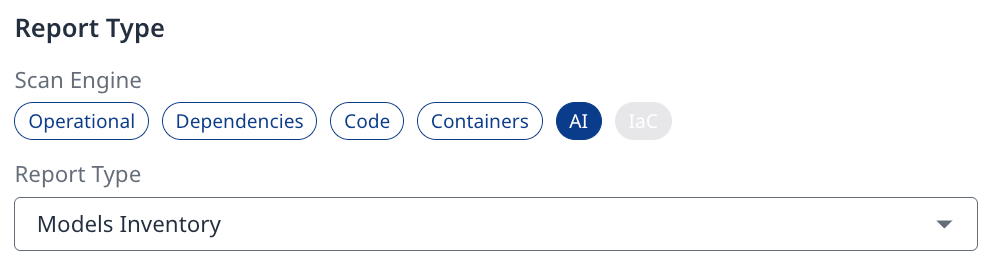
Under the AI scan engine, select Models Inventory.
-
In the Scope settings, select Organization, Application/Project, or Label. Selecting Label scopes the report to specific AI systems or teams (recommended).
-
Specify the Report Name, or use the default name Models Inventory Report, and select the Format (JSON / XML / EXCEL).
-
Click Create to generate your report.
-
Once the report is ready, download it from the Reports page.
Understand the Report
The Excel export contains four sheets:
|
Sheet |
Description |
|---|---|
|
Summary |
General information about the report and the totals it covers. |
|
models |
The model inventory. Contains one row for each model detected in a project. |
|
projects |
The UUIDs of the projects included in the scope of the report. |
|
reportMetadata |
The settings that were used to generate the report. |
The Summary Sheet
|
Field |
Description |
|---|---|
|
|
The Mend service that generated the report. |
|
|
The UUID of the Mend organization. |
|
|
The type of the report. For this report, the value is |
|
|
The date and time the report was generated, in UTC (ISO 8601 format). For example, |
|
|
The total number of model entries in the report. |
|
|
The total number of projects included in the scope of the report. |
The Models Sheet
Each row represents a model detected in a specific project. A model that is used in several projects appears once for each project.
|
Column |
Description |
|---|---|
|
|
The type of the model. |
|
|
The name of the model as detected in the code. For example, |
|
|
The locations in which the model was detected. |
|
|
The unique identifier of the model in Mend. |
|
|
The name of the application that contains the project. |
|
|
The name of the project in which the model was detected. |
|
|
The UUID of the application. |
|
|
The publisher of the model. For example, OpenAI, Anthropic, or Meta. |
|
|
A description of the model, when available. |
|
|
A link to the model's page at its provider, when available. |
|
|
The number of licenses associated with the model. |
|
|
The risk level of the model's licenses. |
|
|
The licenses associated with the model. For example, Proprietary, MIT, or Apache 2.0. |
|
|
The number of locations in which the model was detected in the project. |
|
|
The UUID of the project. |
|
|
The number of risk factors associated with the model. |
|
|
The risk factors associated with the model. |
|
|
The findings on the model that violate a policy. |
|
|
The number of findings on the model that violate a policy. |
|
|
The number of policy violations associated with the model. |
|
|
The policy violations associated with the model. |
The Projects Sheet
Lists the UUID of each project included in the scope of the report, one per row. The number of rows matches the totalProjects value in the Summary sheet.
The reportMetadata Sheet
|
Field |
Description |
|---|---|
|
|
The scope level of the report. For example, |
|
|
The UUIDs of the entities that the report is scoped to. |
|
|
The format of the report. For example, |
|
|
The name given to the report when it was created. |
|
|
The type of the report. For this report, the value is |
|
|
The unique identifier of the report. |
Limitations
-
The report covers AI models only. For other AI components, such as system prompts, agents, tools, and MCPs, use the AI Bill of Materials (AI-BOM) report.
-
Some fields, such as
description,homepage, andlicenses, are populated only when the information is available for the model