
Notes:
-
This feature is currently in open beta.
-
The use of the service indicated under this page is subject to the terms and conditions set forth under our AI Supplemental Terms-of-Service.
Overview
Mend Intelligent Agent is your AI-powered assistant, built directly into the Mend AppSec Platform. Ask it questions in natural language — about your security and legal posture, your findings, or how the platform works — and get instant, accurate answers without leaving the page you’re on. No more hunting through documentation to find what you need.
Data Availability
Mend Intelligent Agent’s responses are based on your role and permissions — you will only see data you are authorized to access. Mend Intelligent Agent reads your organization's live platform data and official Mend.io documentation. It does not use other external web sources, and it only surfaces data you already have permission to see.
Prerequisites
Your organization must provide consent to using AI features via an addendum in your Mend.io contract. Reach out to the account administrator in your organization to request it.
Getting it done
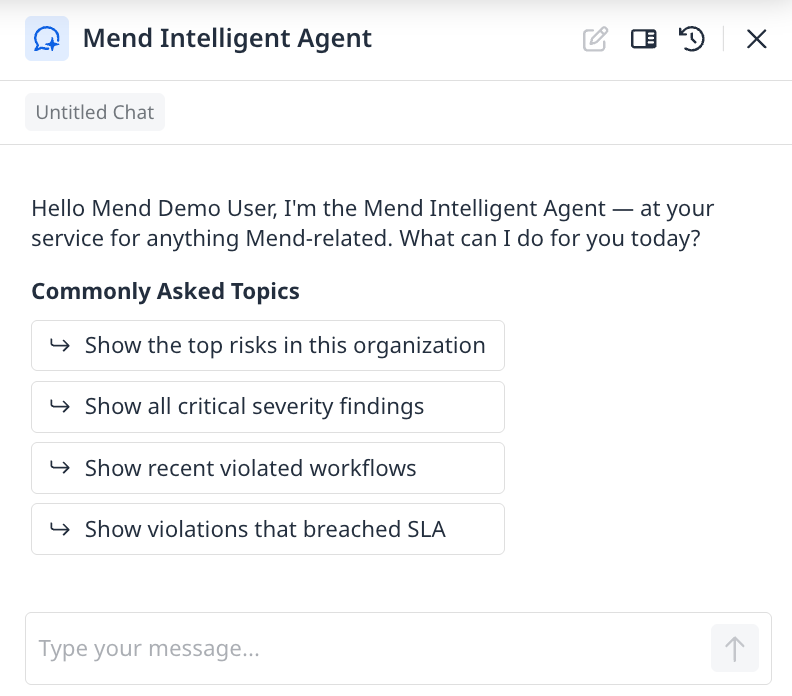
Once enabled for your account, Mend Intelligent Agent will be available in the Mend AppSec Platform user interface, at the top right.

Click the icon to open the chat panel from any page. First-time users will see a short introduction to help you get started. From the chat panel you can ask about your organization's risk posture, navigate to specific views, investigate individual findings, or get answers from the Mend.io documentation — all in one place. Your conversation history is saved so you can pick up right where you left off.
Get an Executive Risk Summary
Ask high-level questions about your organization's security posture. Mend Intelligent Agent pulls live data across all your applications and projects and returns a prioritized snapshot.
Try asking: - "What are the highest-risk findings across my organization?" - "Which applications are contributing the most risk?" - "Show me reachable or exploitable findings" - "How many critical findings do I have right now?"
Navigate Smarter
Tell Mend Intelligent Agent what you want to see and it takes you directly there. Try requesting: - "Take me to the Risk Reduction Dashboard" - "Take me to the Billing-Service application summary page" - "Take me to the applications page sorted by critical severity findings"
Ask Documentation Questions
Get instant answers about how Mend.io works — Workflows, custom roles, integrations, SBOM generation, and more. Every answer includes cited source links so you can verify and explore further. Try asking: - "How do I set up a workflow?" - "How do I configure SSO in Mend?" - "How do I suppress a finding?" - "How do I run a container image scan?"
Recommendations
-
The more specific your question, the more accurate the answer. Include details like severity, project name, time range, or scan type whenever relevant.
|
Instead of... |
Try... |
|---|---|
|
"What's my risk?" |
"Which findings pose the highest risk across my organization?" |
|
“Show me findings" |
"Show me critical and high-severity findings across my billing service application" |
|
"Tell me about SSO" |
“How do I configure SSO with Okta in Mend.AppSec Platform?” |
|
"Take me to a dashboard" |
"Take me to the applications page sorted by critical severity findings" |
-
Every response includes a thumbs up / thumbs down button — your feedback helps us improve the assistant and directly shapes future versions of it.
Limitations
Mend Intelligent Agent currently surfaces information and guides you to the right place — it does not take actions on your behalf. This may expand in future versions.
Mend Intelligent Agent cannot:
-
Suppress or modify findings
-
Create Jira tickets or open issues
-
Change any settings or configurations
-
Access data outside your organization