.svg)
Overview
By default, the Mend AppSec Platform UI displays data with no restrictions, including historical data from every project ever scanned. This is configurable by Mend.io, however, allowing organizations to restrict displayed data and report data to active projects only.
The Active Projects feature is useful when you wish to reduce clutter and improve UI performance.
Note: Please reach out to your Customer Success Manager at Mend.io to enable the feature.
Getting it done
-
Reach out to your Mend.io to enable the feature.
-
Once enabled, only active projects will be displayed in the UI and reports.
An active project is a project that has been created or scanned in the last twelve months. This value is, however, configrable by Mend.io. Available values: 3, 6, 12, 18, 24, 36. -
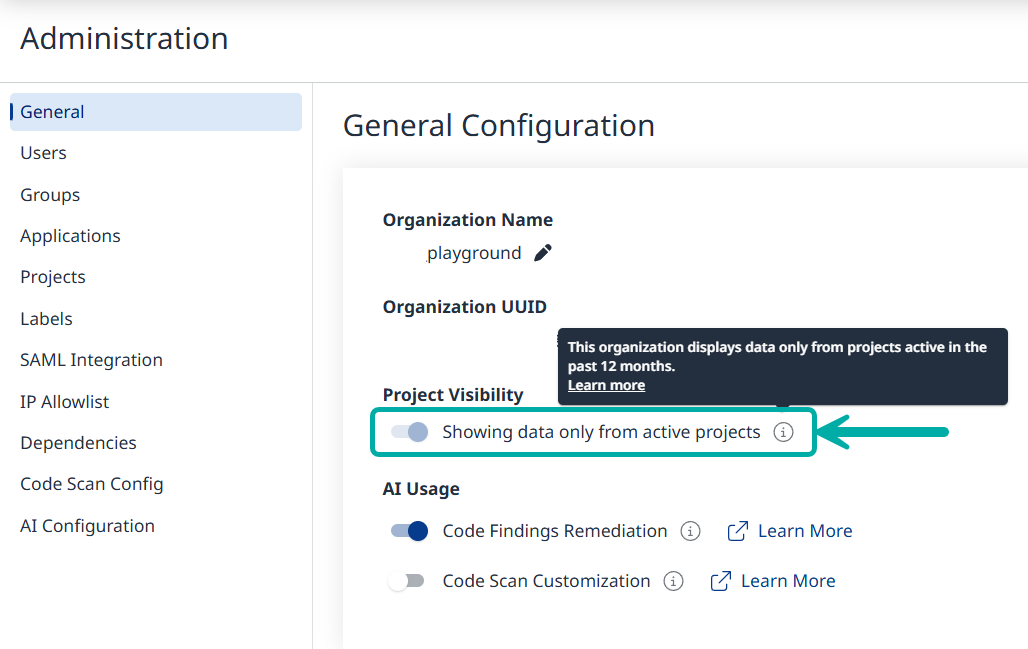
Once enabled, a view-only toggle will become visible to organization administrators under Adminitration → General, showing that the feature is enabled.
Click the tooltip to see the number of months configured for active projects.
Example: “This organization displays data only from projects active in the past 12 months.”
Impact on Views and Reports
Note: The changes below affect the UI and also the API, where applicable.
When the Active Projects feature is enabled, it will have the following impact on views and reports:
-
Applications & Projects Views – Show only active projects by default but support searching inactive projects. Statistics are updated according to search results.
-
Summaries (Application & Project) – Default to active projects only but support the option to include inactive projects. Statistics reflect the selected scope.
-
Violations & Security Tables – Default to active projects only but allow access to inactive projects when searched.
-
Dashboards – Limited to the Active Projects' number-of-months value (twelve months by default).
-
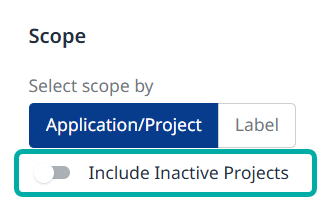
Reports – A toggle in the Create Report wizard allows users to include inactive projects (excluded by default).
-
Findings – Searches for libraries and/or findings in active projects only.
-
Administration –
-
The Status column in the Projects page denotes a project is Active/Inactive.
-
The Projects column in the Applications page (denoting the project count) is split into two columns: Active Projects / Inactive Projects.
-
-
Workflows -
-
When creating a workflow with a Project/By Name scope condition, only active projects are listed, although the search supports inactive projects as well.
-
Project/By Regex applies to both active and inactive.
-
Note: Zero-Day exposure data apply to both active and inactive projects.