.svg)
Overview
A Zero‑Day event is a newly disclosed, high‑risk vulnerability which is identified and actively tracked in the Mend Platform.
During an active Zero‑Day:
-
Mend.io immediately surfaces the risk in the UI.
-
You can investigate impact across your applications and projects.
-
You can enforce policies using workflows and violations (coming soon).
This page explains how the Mend Platform helps you respond to Zero‑Day vulnerabilities, and what you can actively do in the product when such an event occurs.
Note: Mend.io may use the Zero-Day feature to alert on vulnerabilities that are not technically zero-days (e.g., CanisterWorm Supply Chain Attack) but require similar mitigation steps.
The Zero-Day Banner
Mend.io will alert users to recent zero-day events with a banner towards the top of the platform UI.

This banner is a hub for all zero-day related information and action.
On the left you will see the name of the zero-day event, followed by its impact on your organization’s inventory. Possible statuses include:
-
No exposure detected so far - stay alert.

-
Exposure was detected in your organization. Immediate action is required.

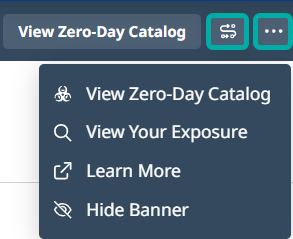
On the right side of the banner you have two notable buttons:
-
The S-shaped button will direct you to the Workflows page, prefilled with recommended settings for creating an automation workflow that will help you mitigate the zero-day in your applications.
-
The rightmost button will spawn the Actions menu, allowing you to perform the following actions:
-
View Zero-Day Catalog: Navigate to the Zero-Day Catalog page which displays general information about zero-day events (not specific to your inventory).
-
View Your Exposure: Navigate to the zero-day findings report that is relevant to your organization’s inventory.
-
Learn More: Open this documentation page in a new browser tab.
-
Hide Banner: Allows you to hide the banner. It will respawn when a new zero-day is detected.
-
View Your Exposure
For Zero‑Day response, Mend.io correlates Zero‑Day information with your existing inventory.
-
Source of truth: Your existing inventory from previous scans.
-
Matching logic: A vulnerability is associated with your assets if:
-
MSC ID matches, or
-
Library name matches.
-
Click the red View Your Exposure button to navigate to the zero-day findings report that is relevant to your organization’s inventory.
Note:
-
No new scan is automatically triggered by the Zero‑Day event itself.
-
Mend.io uses what you have already scanned to determine impact.
Zero-Day Workflows
When a zero-day is detected in your inventory, it is recommended to take immeidate action to mitigate it. Mend.io helps you by offering prefilled automation workflows that will create a violation and fail the pipeline whenever a zero-day is detected in your inventory.
New Zero-Day Workflows (Recommended)
Note:
-
Once set up, “Zero-Day - New” workflows are triggered automatically for subsequent zero-day events. No manual execution or scan is required to trigger violations, unless you wish to fail the pipeline, in which case a scan is necessary.
-
For existing zero-day events (active during the workflow setup), a rescan is required to apply the new workflow to existing inventory and display current exposure.
-
A workflow with the Send Email action delivers the dedicated zero-day alert only when affected packages are found in the scoped inventory, with frequency locked to
Immediately.-
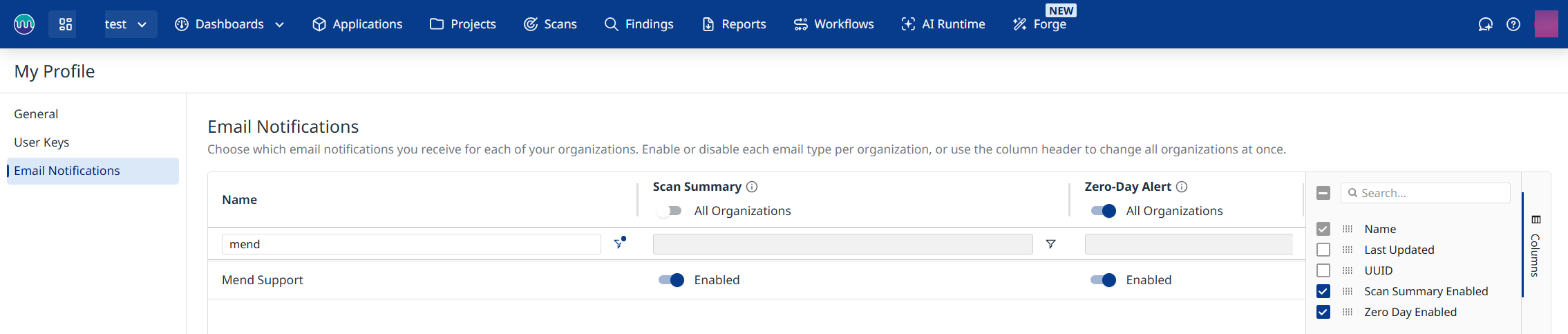
A generic email informing admins that a new zero-day has been discovered will be sent regardless and does not indicate your inventory is impacted. This notification can be switched off per organization (or all organizations) via the Zero-Day Alert column in the Email Notifications page under “My Profile”.
-
When a new zero-day event is in effect, enforcement measures need to be configured: Violations, Jira tickets, and notifications. These only become effective after a Zero-Day workflow is created.
Follow these steps to set it up:
-
Navigate to Workflows → Create From Template
-
Select the Zero-Day Event template
-
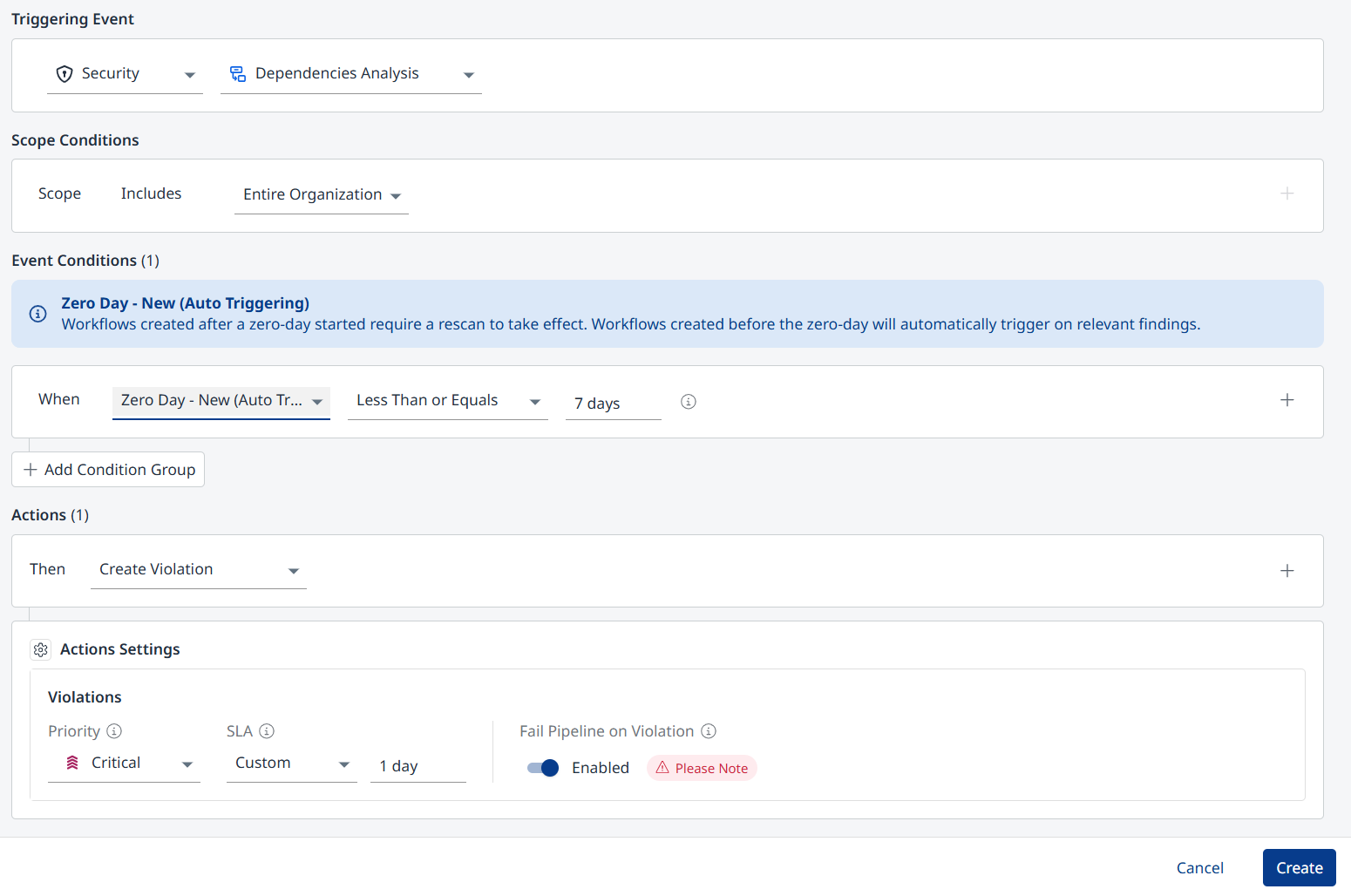
The workflow is prefilled as follows:
-
Triggering Event: Security - Dependencies Analysis
-
Scope: Entire Organization
-
Event Conditions (When):
-
Zero-Day - New (Auto Triggering)
-
Less Than or Equals - 7 days
-
-
Actions: Create Violation
-
(Optional) Send Email: Add this action to send an email with newly detected vulnerabilities to relevant users on a predefined frequency.
-
-
Actions Settings - Violations:
-
Priority: Critical
-
SLA: 1 day
-
Fail Pipeline on Violation: Enabled
-
-
-
Click Create.
Workflows for Specific Zero-Days
You have the option to create workflows for specific zero-day events, including inactive ones.
The default workflow settings for mitigating the zero-day are:
-
Triggering Event: Security - Dependencies Analysis
-
Scope: Entire Organization
-
Event Conditions (When):
-
Zero-Day Event
-
Add the desired zero-day events to monitor
-
-
Actions: Create Violation
-
Actions Settings - Violations:
-
Priority: Critical
-
SLA: 1 day
-
Fail Pipeline on Violation: Enabled
-
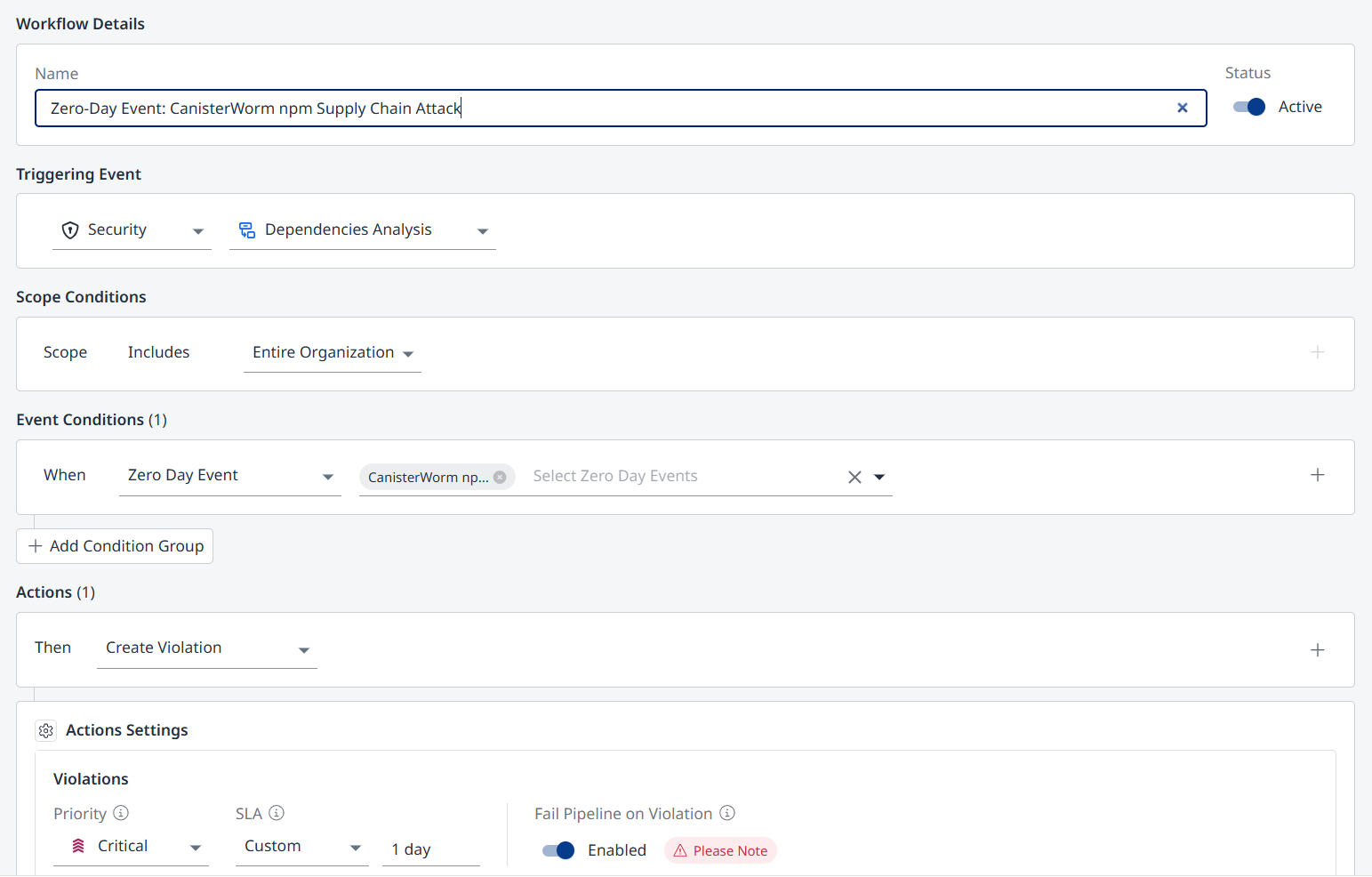
You can change the settings to match your organization’s policy.
Click Create when you’re ready to apply the workflow.
Zero-Day Reporting
-
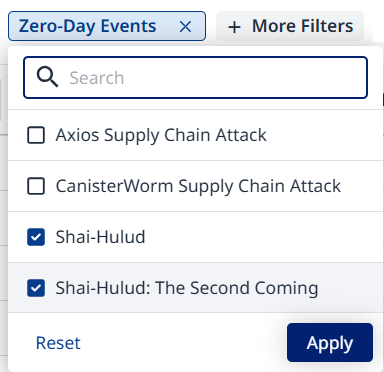
The Applications/Projects views can be filtered by specific zero-day events impacting them.
-
Click the filter after adding it to select the desired zero-day events.
-
-
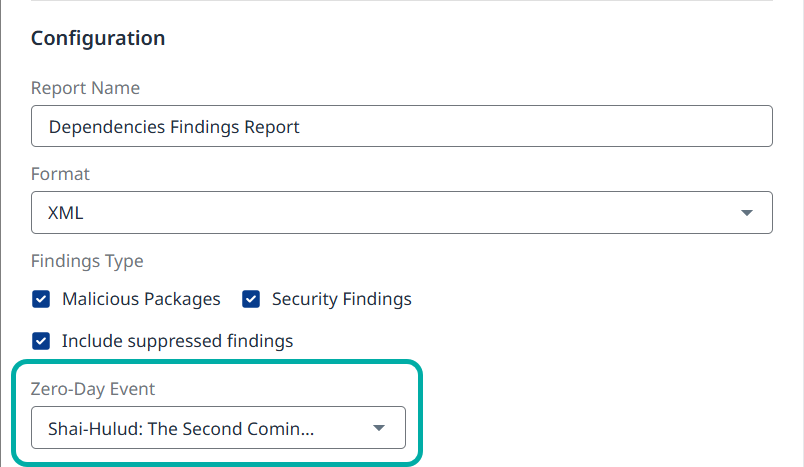
The Dependencies Findings report can be configured to include specific zero-day event findings.
-
This report is also available at the account level.
-
-
The Zero-Day Catalog is available as a standalone report.
Zero‑Day Catalog
Note: The Zero-Day Catalog is independent of your inventory and doet not represent your organization’s exposure to the zero-day vulnerability.
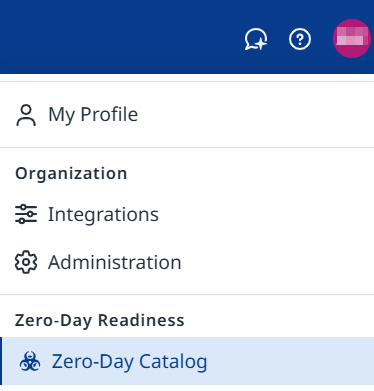
The Mend Platform provides a dedicated Zero‑Day Catalog, available via your Profile menu. It’s designed as a live, authoritative source of Zero‑Day information. It is independent of your inventory: You can see Mend.io’s Zero‑Day data even before or beyond your specific scans.
The most recent active Zero‑Day will be selected by default. You can use the drop-down menu at the top to switch between Active Zero‑Days and Historical ones (which remain visible indefinitely).
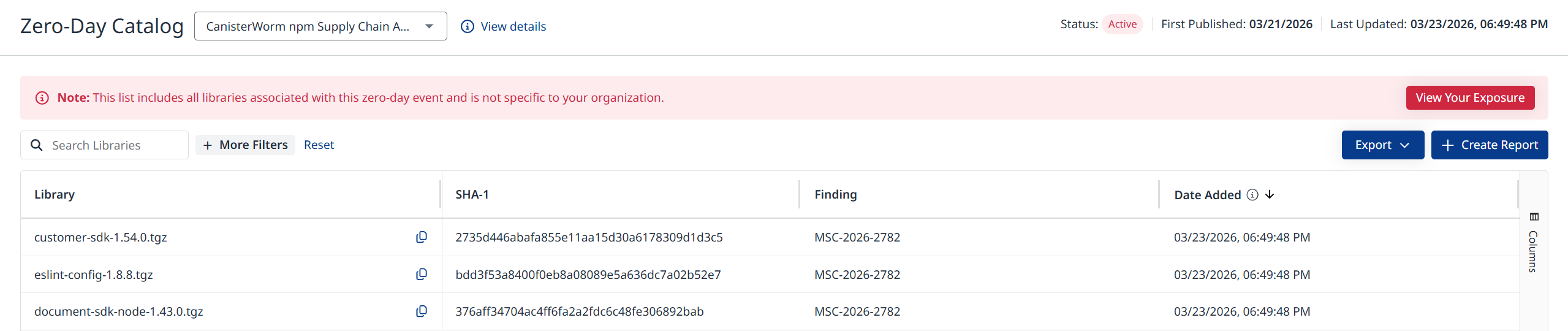
The catalog displays a live table of Zero‑Day entries. Available columns include:
-
Library: The library name
-
SHA‑1: The SHA-1 value of the library
-
Finding: The vulnerability ID
-
Data Added: The date the library was added to this zero-day event after being identified by Mend.io.
-
Zero-Day Name: This column can be added via the Columns menu on the right.
Export Zero-Day Data
You can sort and filter the table as well as export the data in CSV or JSON format (using the Export button at the top-right), to support internal reporting or audits.
This replaces static spreadsheets with a live, UI‑based and API‑backed view.
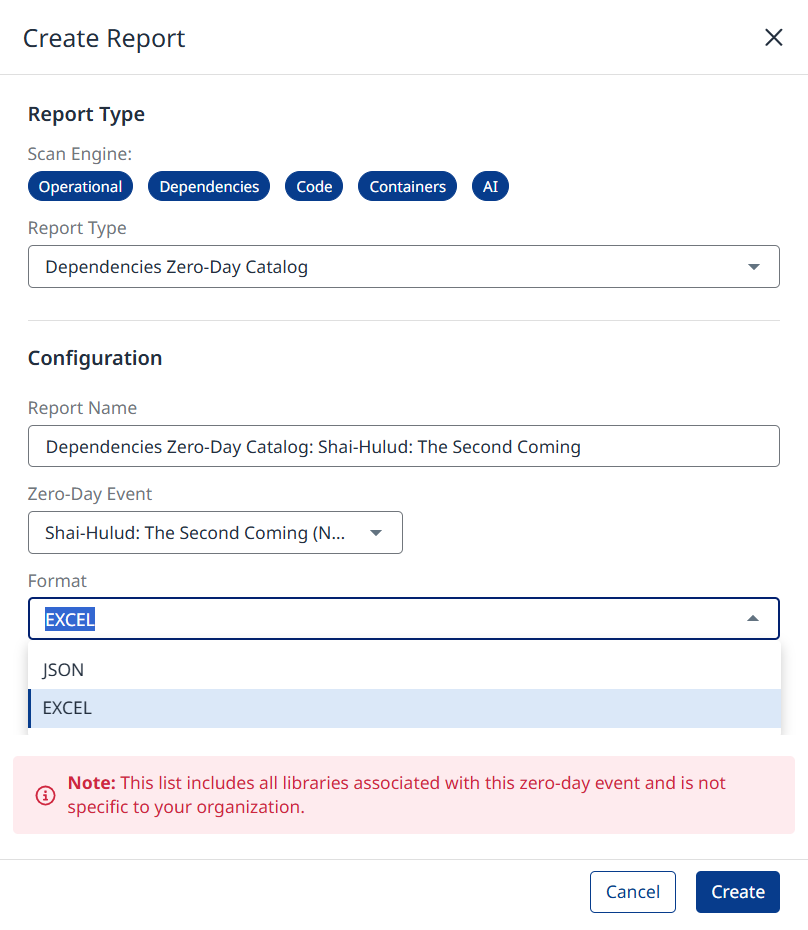
The Zero-Day Catalog is also available in Reports.
API Access
In addition to the platform UI, you can access zero-day data programmatically using the Mend API 3.0. The following endpoints are available:
Your Exposure APIs
Project
Use the project findings APIs with the zeroDayIdentifier query parameter (followed by the zero-day event’s UUID or name) to filter project findings that are related to the specified zero-day event.
Account/Organization/Application
Zero-day data is available in the Dependencies Findings report.
-
Export account Dependency Security Findings report asynchronously (Dependencies - SCA)
-
Export account Dependency Security Findings by Library report asynchronously (Dependencies - SCA)
Zero-Day Catalog APIs
These are general findings that are unrelated to your inventory. Results may change over time, especially during an active zero-day event.
-
Get all Zero-Day Events: Returns a list of all Zero-Day Events with optional date filters.
-
Get Affected Packages for a Zero-Day Event: Returns all packages affected by the specified zero-day event from the previous endpoint.
Visit the Zero-Day Catalog API documentation for more details.
Zero‑Day Lifecycle and TTL
Each Zero‑Day progresses through two main phases in Mend:
Active phase (Days 0–30 after publication)

During the active phase:
-
Awareness and violation banners are displayed where relevant.
-
The Zero‑Day Catalog page shows status = Active
-
Inventory correlation is active (based on existing scans).
Expired phase (after Day 30)

After 30 days:
-
All Zero‑Day banners are removed from the UI.
-
The Zero‑Day is no longer considered active.
-
The Zero‑Day Catalog page shows status = Expired