.svg)
Overview
Once your Mend for Gitlab IaC scan has been completed, there are multiple resources provided to help you review your results.
Mend IaC Check
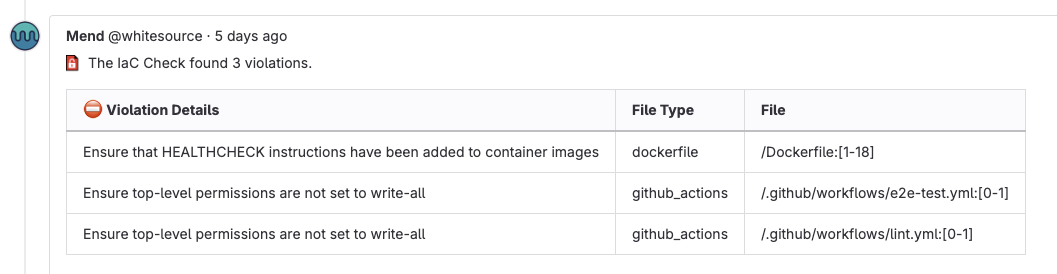
Once the Mend for GitLab IaC scan is completed, the Mend IaC Check is updated with an IaC Report that provides an overview of the IaC violations found:
-
Violation Details: Recommendation information to correct the IaC violation
-
File Type: Type of file impacted by the IaC violation
-
File: Directory, file, and code line(s) where the IaC violation is located
The Mend IaC Check also includes a Scan token, which you can provide to Mend Support for troubleshooting.
IaC GitLab Issue
Note: By default, each IaC Issue is created with the “Mend: IaC Violation” Issue label
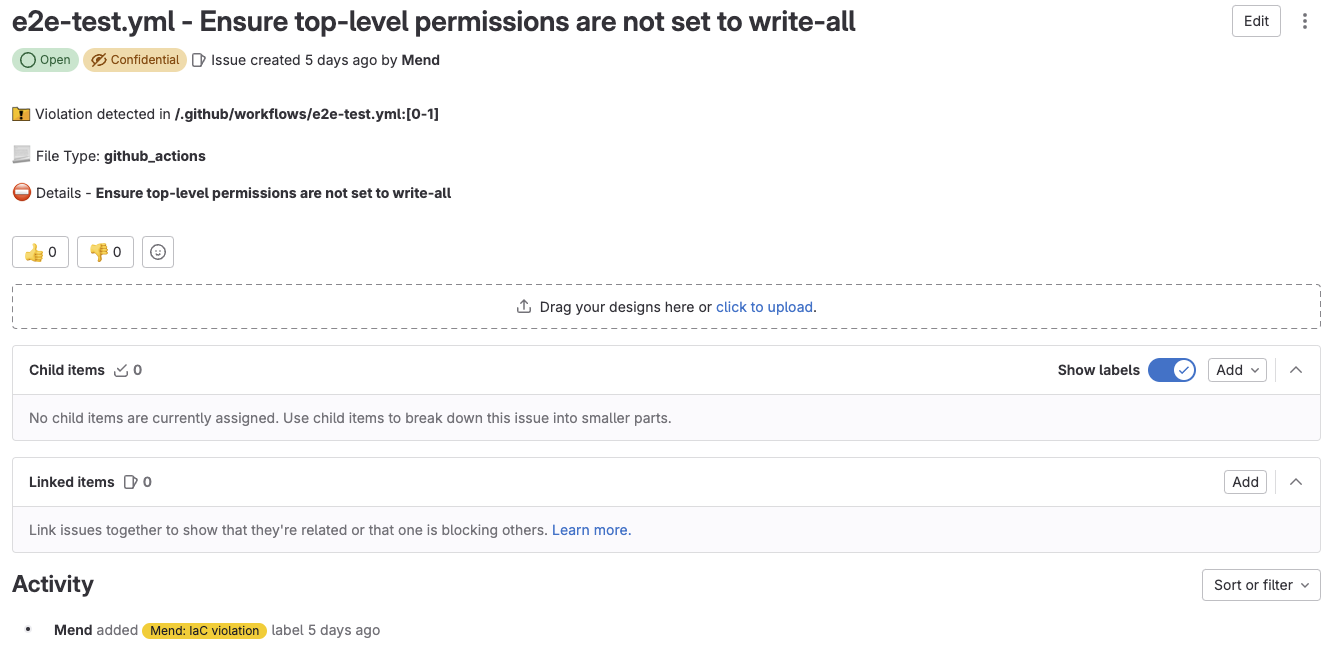
Once the Mend for GitLab IaC scan is completed, the Mend IaC Check creates a GitLab Issue for each finding:
-
Violation detected in: Directory, file, and code line(s) where the IaC violation is located
-
File Type: Type of file impacted by the IaC violation
-
Details: Recommendation information to correct the IaC violation
Note: When an IaC Issue is closed, the violation will not be detected in future scans.
IaC Email Notification
Once the Mend for GitLab IaC scan is completed, if you have GitLab email notifications enabled for GitLab Issues, you will receive an email for each GitLab Issue created by the IaC scan.