.svg)
Overview
Mend Platform users can manage their profile via the user interface, allowing them to configure general user settings, user keys and email notifications.
Getting Started
-
Log into the Mend Platform
-
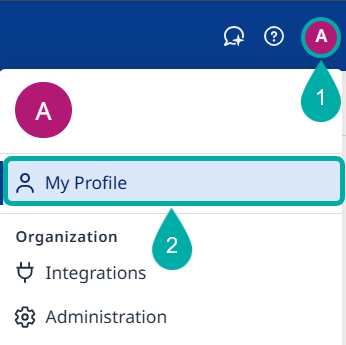
Click the profile icon at the upper right corner of the user interface and then select My Profile.
My Profile
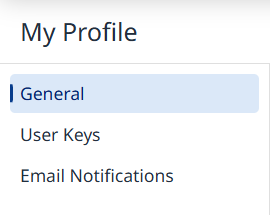
From the left pane, select the settings you would like to set (General, User Keys, Email Notifications)
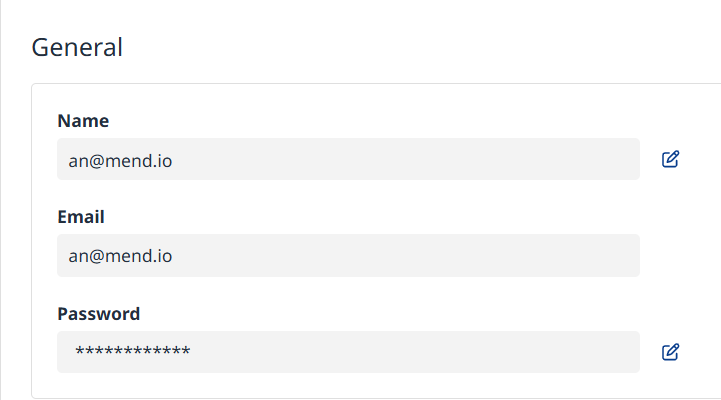
General
Here you can change your username and password.
User Keys
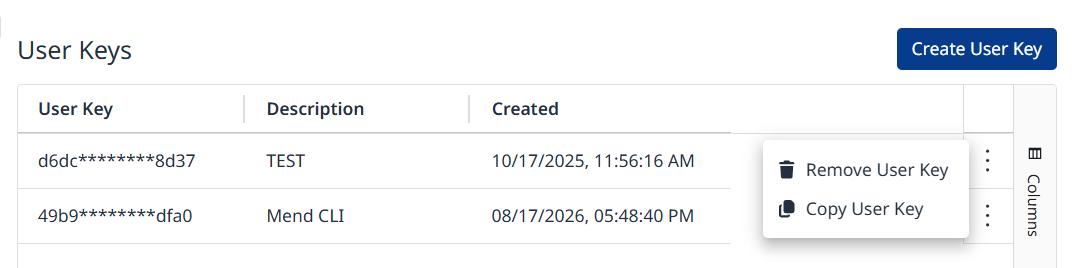
Here you can manage your user keys:
-
Create a new user key by clicking the Create User Key button on the top right.
-
Delete a user key by selecting Remove User Key from the relevant row’s Actions menu.
-
Copy the key to the clipboard by selecting Copy User Key from the relevant row’s Actions menu.
Email Notfications
Configure the desired settings for Scan Summary emails and Zero-Day Alert emails.
-
Scan Summary Email: A summary of scan results, sent each time a scan completes. Available in organizations where you’re an Organization Admin or Application Admin.
-
Zero-Day Alert Email: An alert email sent when a new zero-day event is published, detailing your organization’s exposure. Available only in organizations where you’re a member.
-
Visit this page for more information on using the Mend Platform to manage Zero-Day events.
-
