.svg)
Notes:
-
This feature is in open beta.
-
This feature requires a Mend AI Core or Premium subscription.
-
The use of the service indicated under this page is subject to the terms and conditions set forth under our AI Supplemental Terms-of-Service.
-
-
To take action on detected agents, refer to the Triage article.
Overview
Mend AI scans your source code to automatically detect and inventory AI agent components built with popular agent frameworks. The scan identifies:
-
Agents — distinct agent instances constructed in your code
-
Models — LLM model references (e.g.
gpt-4o-mini,claude-3-sonnet) -
System prompts — instruction strings assigned to agents
-
Tools — callable functions or plugins attached to agents
-
MCP servers — Model Context Protocol server references
-
Relations — connections between agents such as handoffs, delegation, and group membership
All detected components appear in their respective inventory tables in the Mend Platform UI, giving you a unified view of your AI agent architecture.
Prerequisites
AI Agents detection is available only with an active Mend AI Core or Premium subscription.
Getting it done
-
Navigate to the desired application or project in the Mend Platform.
-
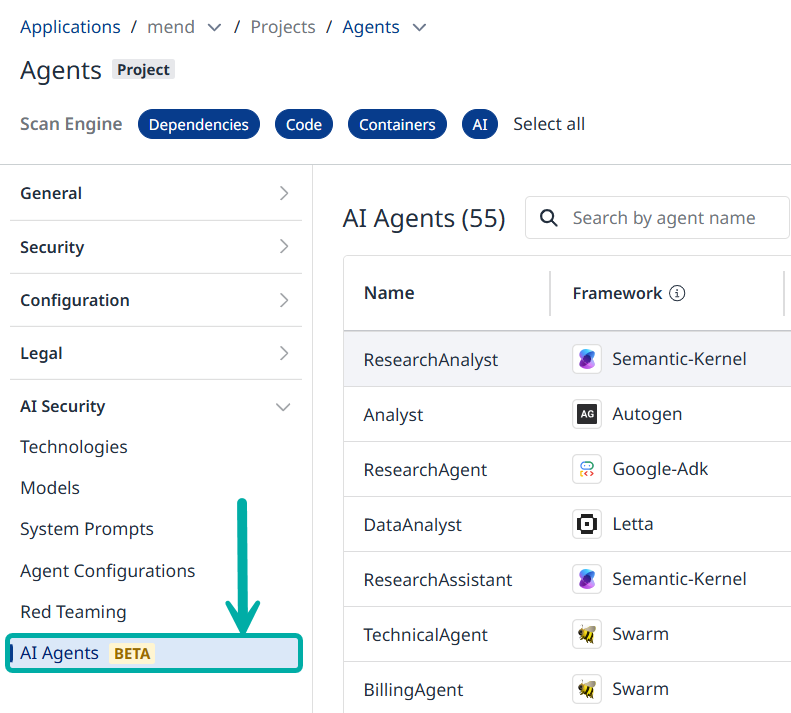
On the left pane, click on AI Agents. This will take you to the AI Agents table.
The AI Agents Table
The AI Agents table contains the following columns:
-
Name
-
Framework
-
Models
-
System Prompts
-
Tools
-
Severity
-
MCPs
-
Violations
-
Aggregated Findings
-
Language (e.g., “Python”)
-
Code Location
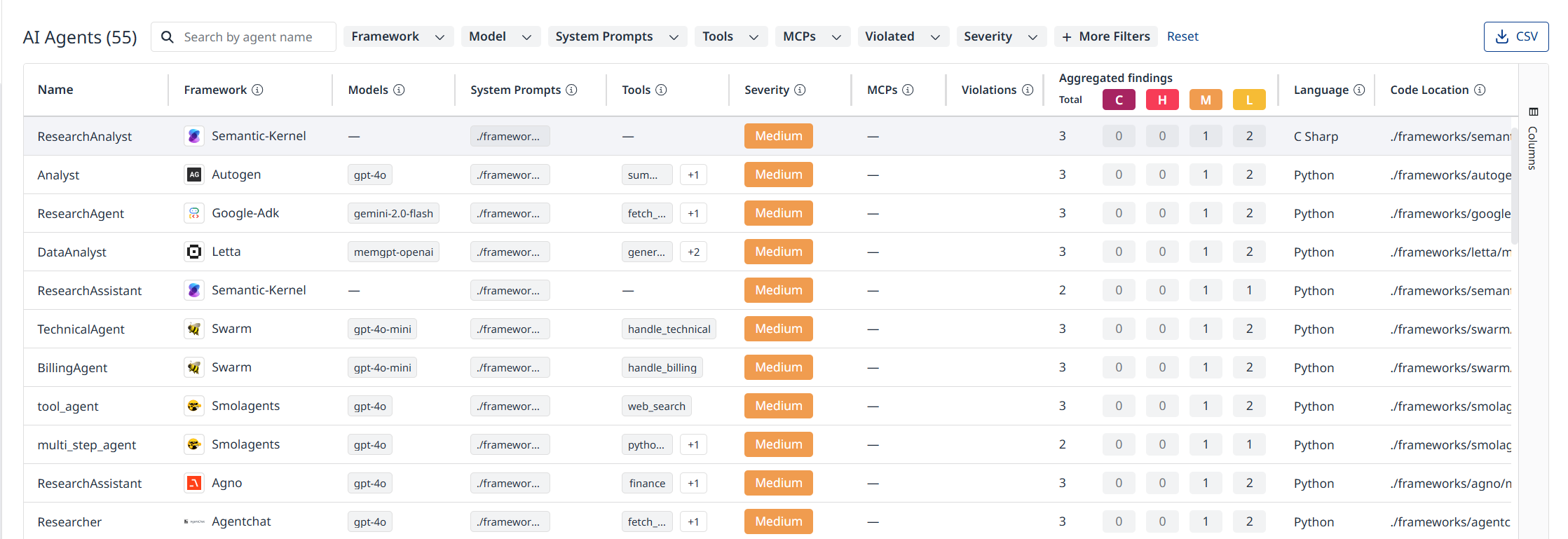
Use the searchbox and filters at the top to display agents that meet your criteria.
Export the data currently visible in the table by clicking the CSV button at the top right.
Click the Reset button at the top to cancel the filters and restore the original table.
The AI Agent Side-Panel
Click on a row to display that AI Agent’s side-panel.
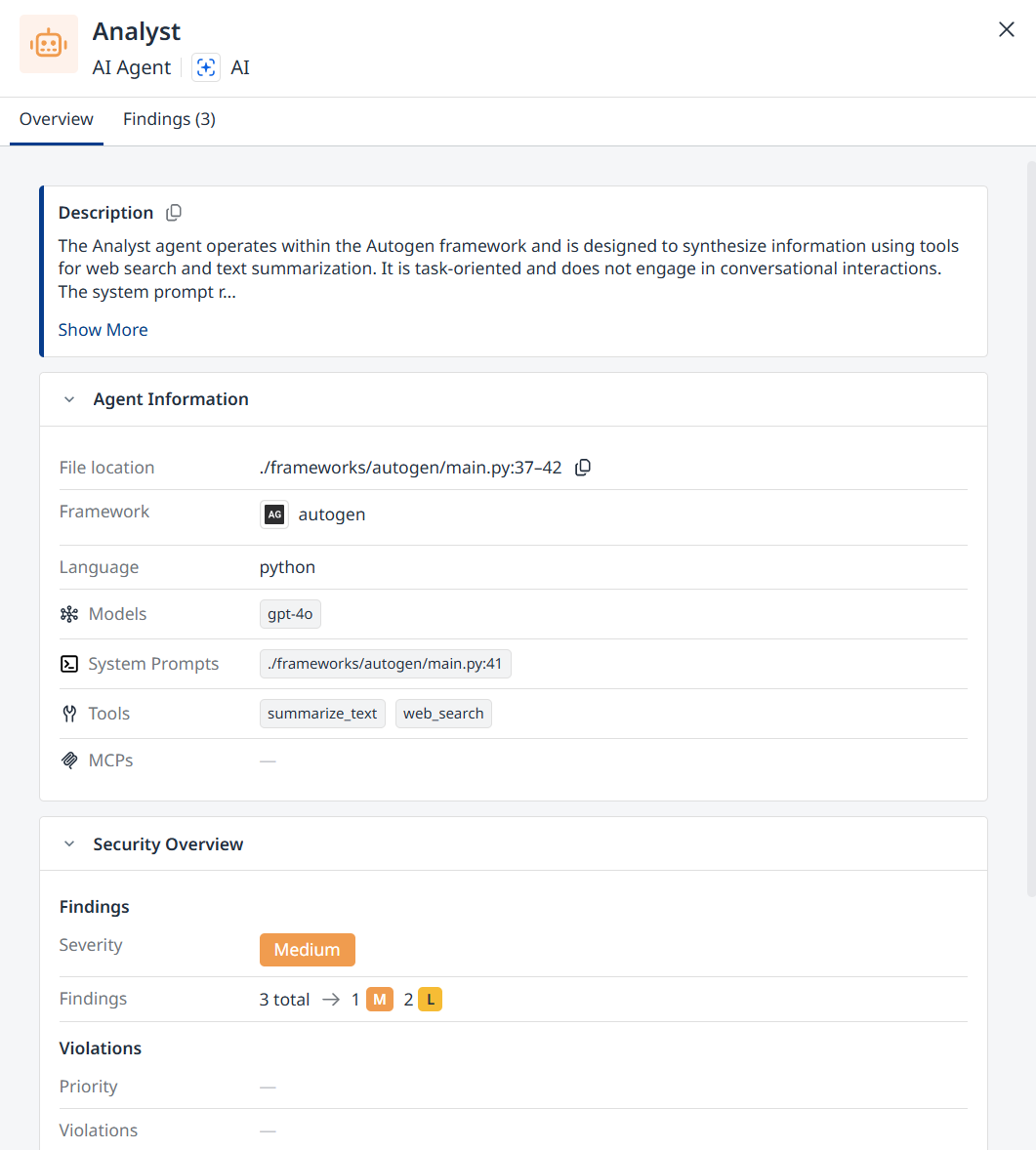
The side-panel lists all the information about the agent in two tabs: Overview and Findings.
The Overview Tab
Contains the agent’s description and the same information listed in the AI Agents table (Framework, Language, etc.)
The Findings Tab
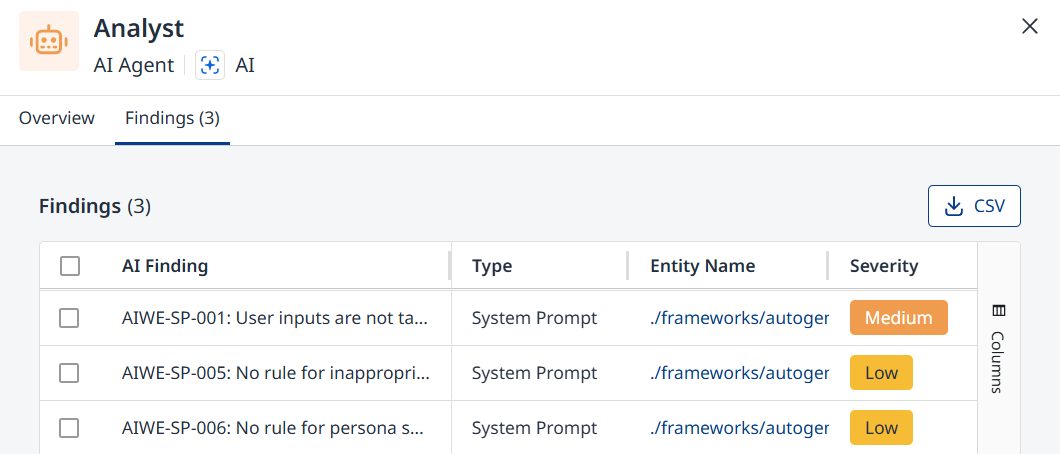
Switch over to the Findings tab to list the AI Findings applicable to the agent in question.
The findings table lists the following columns:
-
AI Finding (the name and description of the finding)
-
Type (e.g., “System Prompt”)
-
Entity Name
-
Severity
-
Finding Id
-
Violations
Supported Frameworks
|
Framework |
Language |
File Extensions |
Agents |
Models |
System Prompts |
Tools |
MCP Servers |
|---|---|---|---|---|---|---|---|
|
AgentChat |
Python |
|
✅ |
✅ |
✅ |
✅ |
✅ |
|
Agno |
Python |
|
✅ |
✅ |
✅ |
✅ |
✅ |
|
AutoGen |
Python |
|
✅ |
✅ |
✅ |
✅ |
✅ |
|
Azure OpenAI Plugins |
JSON / YAML |
|
— |
— |
✅ |
✅ |
— |
|
CAMEL |
Python |
|
✅ |
✅ |
✅ |
✅ |
✅ |
|
CrewAI |
Python |
|
✅ |
✅ |
✅ |
✅ |
✅ |
|
Dify |
JSON / YAML |
|
✅ |
✅ |
✅ |
✅ |
✅ |
|
Google ADK |
Python |
|
✅ |
✅ |
✅ |
✅ |
✅ |
|
LangGraph |
Python |
|
✅ |
✅ |
✅ |
✅ |
✅ |
|
Letta |
Python |
|
✅ |
✅ |
✅ |
✅ |
✅ |
|
LlamaIndex |
Python |
|
✅ |
✅ |
✅ |
✅ |
✅ |
|
Mastra |
TypeScript / JS |
|
✅ |
✅ |
✅ |
✅ |
✅ |
|
n8n |
JSON |
|
✅ |
✅ |
✅ |
✅ |
✅ |
|
OpenAI Agents SDK |
Python |
|
✅ |
✅ |
✅ |
✅ |
✅ |
|
Pydantic AI |
Python |
|
✅ |
✅ |
✅ |
✅ |
✅ |
|
Semantic Kernel |
Python / C# |
|
✅ |
✅ |
✅ |
✅ |
✅ |
|
Smolagents |
Python |
|
✅ |
✅ |
✅ |
✅ |
✅ |
|
Swarm |
Python |
|
✅ |
✅ |
✅ |
✅ |
— |
How Detection Works
Step 1 — File Discovery
During a scan, Mend identifies source files that match the supported file extensions above. Files in excluded paths (vendor directories, build output, etc.) and any paths matching your custom path exclusion globs are skipped.
Step 2 — Framework Identification
Each file is checked for framework-specific markers — typically import statements (Python) or structural patterns (JSON/YAML workflows). Only files that match a known framework proceed to full analysis.
Step 3 — Entity Extraction
Mend parses the source code to identify agent constructions, model references, prompt strings, tool declarations, and MCP server configurations. Detected entities are attributed to their parent agents where applicable.
Step 4 — Inventory Merge
All detected entities are merged into the global inventory tables. For example, a model referenced inside an agent definition appears both on the agent's detail view and in the overall Models table.
Agent Relations
Mend detects relationships between agents in multi-agent systems:
|
Relation Type |
Description |
|---|---|
|
Group membership |
Agent belongs to a multi-agent group (team, swarm, group chat) |
|
Delegation / Handoff |
One agent delegates work to another (sub-agents, handoffs, conditional routing) |
|
Resource usage |
Agent uses a non-agent resource (tool executor, sub-graph, human input node) |
Relations are detected for: AgentChat, AutoGen, Agno, CrewAI, Dify, Google ADK, LangGraph, LlamaIndex, Mastra, n8n, OpenAI Agents SDK, and Swarm.
Known Limitations
Mend AI uses static source-code analysis to detect agents, models, prompts, tools, and MCP servers. Because the scan reviews source files without running the application, some values may be shown as “Dynamic.”
What Mend AI Can Detect
-
Values written directly in the supported file, such as a model name, prompt text, or tool list.
-
Simple variables or constants defined in the same file.
-
Simple same-file literal values, including basic string concatenation and simple lists.
Limitations and Mitigation
-
Cross-file references: Values imported from other files may be shown as their variable or reference name instead of the resolved value.
-
Runtime or external values: Values built at runtime, read from files, pulled from environment variables, or fetched from external services cannot be fully resolved during the scan.
-
Dynamic chips: A Dynamic chip means Mend AI detected that a model, prompt, tool, or MCP server is configured, but could not determine the exact value from the source file.
-
Partial prompts: Some frameworks build a final prompt from multiple fields. Mend AI may show these fields as separate prompt findings instead of combining them.
-
Ambiguous fields: In a few frameworks, some fields can be either descriptive text or prompt instructions. Mend AI reviews the content and reports it only when it is likely to be a prompt.