.svg)
Overview
The Mend Reachability tool helps you assess the effectiveness of security vulnerabilities associated with open-source components, to prioritize fixing those vulnerabilities.
We want to reduce developers' security burden by utilizing Mend.io’s innovative differentiation - reachability analysis - easily, as part of the Mend Developer Platform. This will enable developers to focus on fixing the reachable vulnerabilities in their repository.
In the real world, a medium but reachable vulnerability might be prioritized higher by developers than a critical but unreachable vulnerability.
This article will explain about Mend.io’s Reachability technology in the Mend Developer Platform and how to use it.
Getting it done
Prerequisites before getting started with Reachability
-
Mend Developer Platform installed with a Mend paid account connected to your source code repository.
-
A repository that uses one of the supported package managers.
Note that Reachability relies on the existence of the following elements in the repository:-
Source code files (e.g., .java, .js).
-
Manifest files (e.g., pom.xml, package.json).
-
Scanning in the Mend Developer Platform with Reachability
Use case for Reachability
The initial use case for reachability is that a repo scan includes a “reachability scan” step. This means that the scan may take longer. In the end, the repo scan results will be enriched with reachability information - the scan report will include a visual indication on whether the listed vulnerability is reachable or not.
Once enabled, the reachability indication will be visible as part of the post-scan reports.
Enable Reachability
-
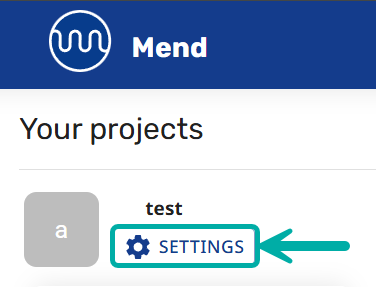
To enable Reachability scans on the Mend Developer Platform, navigate to the organization or project settings.
-
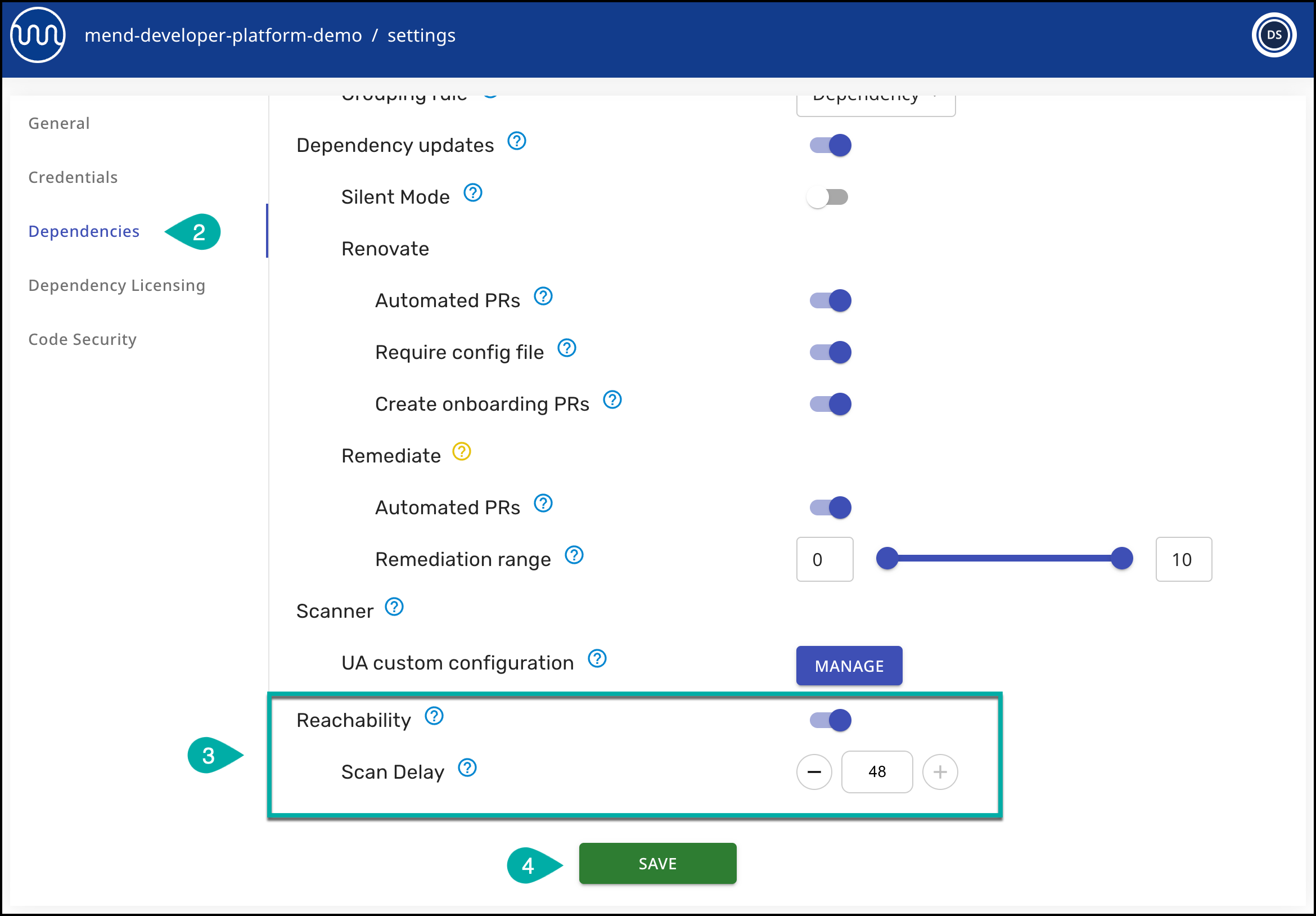
Choose Dependencies from the left navigation menu.
-
Scroll down and enable the Reachability toggle, and set up the scan delay, which defines the time interval for which code commits, including changes to the existing supported source files, will trigger an SCA and Reachability check run
-
Click SAVE.
Viewing results in the Mend Developer Platform
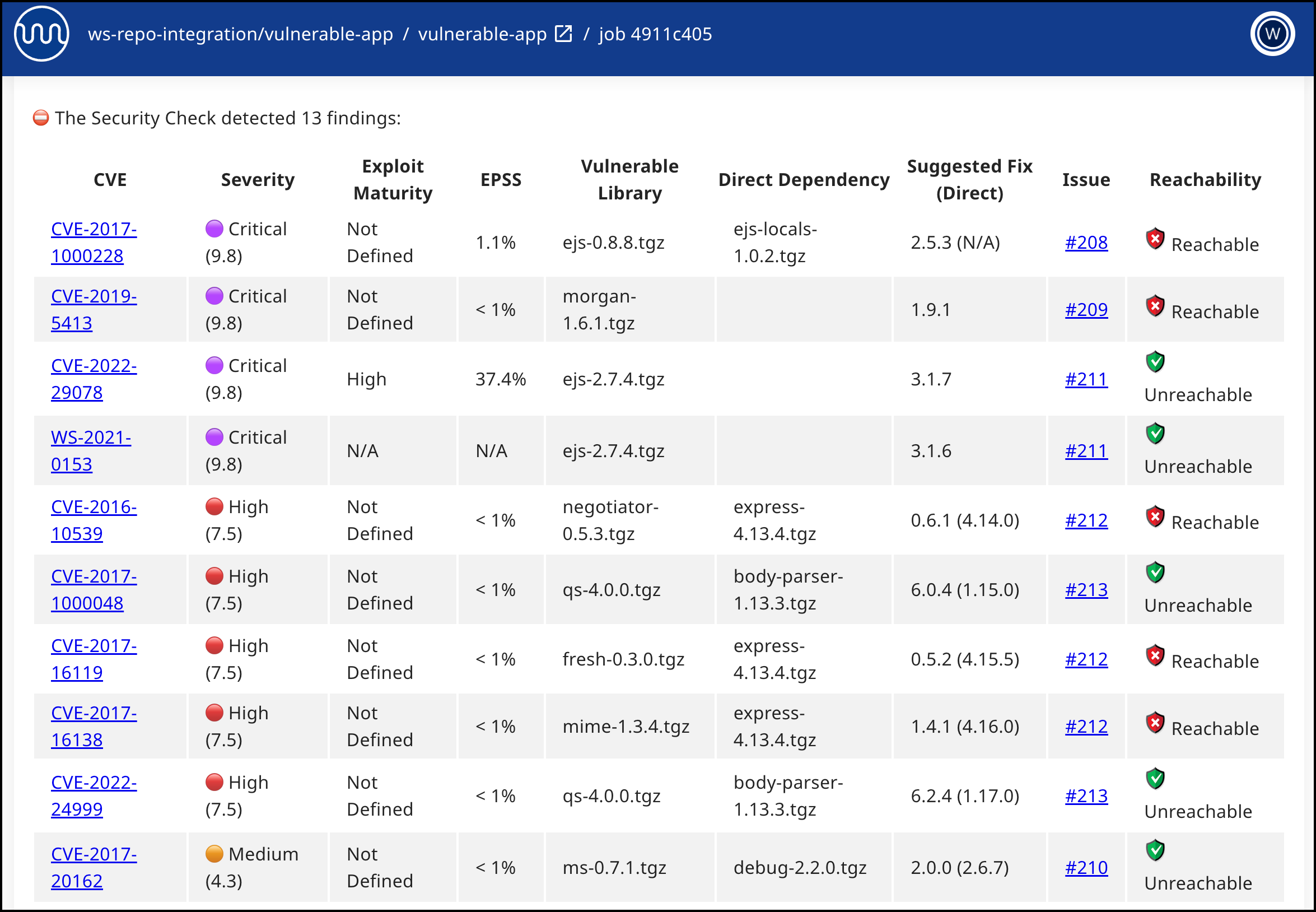
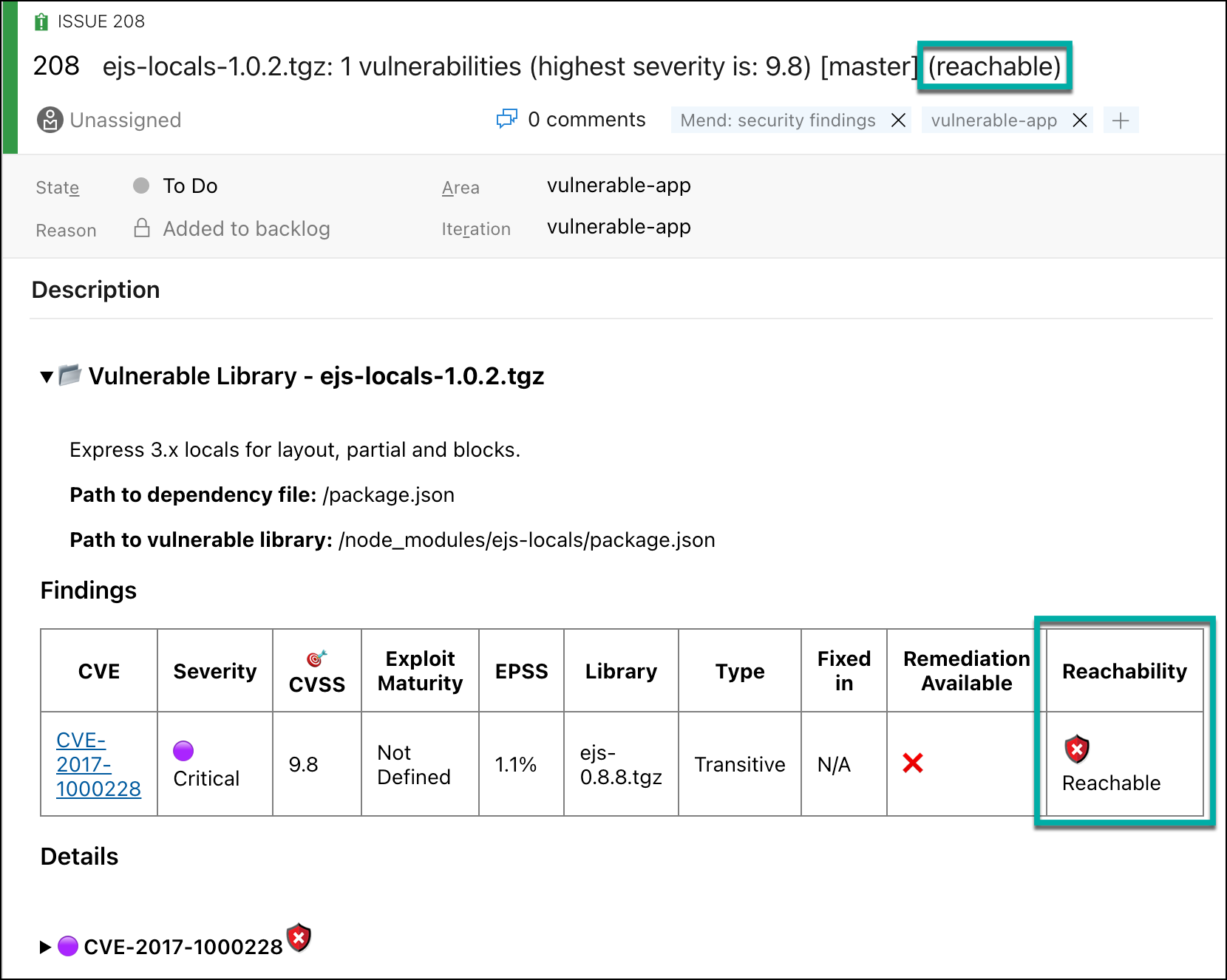
The Reachability results will be visible in the following locations within the repository:
-
Check Run results (Security Check)
-
Work Items (Azure DevOps and GitLab) / Issues (Bitbucket and GitHub)
Viewing the results in the Mend Platform UI
Kindly follow this article for the full details.
Reference
Regular Mend SCA check runs are triggered on code commits that include one of the following:
-
Changes to packages (manifest) files
-
Addition or deletion of supported source files
When reachability is enabled, each Mend SCA check run will include reachability analysis and will be triggered on code commits with the following logic:
-
Changes to packages (manifest) files (same as regular SCA check runs)
-
Addition or deletion of supported source files (same as regular SCA check runs)
-
Changes to existing supported source files - after an elapsed time interval has passed (new for reachability)
Supported Languages
The Reachability Supported column in the the table below indicates which languages and package managers are Reachability-supported in the Mend Developer Platform.
|
Language (Package Manager) |
Package Manager Versions |
Language
|
Reachability Supported |
Exclusion
|
Repo Integration Parameter |
|---|---|---|---|---|---|
|
C/C++ (Conan) |
Conan 2.12+ |
|
✔️ |
MEND_SCA_CONAN_RESOLVEDEPENDENCIES |
conan.resolveDependencies |
|
C# (.NET) |
NuGet |
.NET 5.0.x, 6.0.x, 7.0.x, 8.0.x, 9.0.x, 10.0.x |
✔️ |
MEND_SCA_NUGET_CSPROJ_RESOLVEDEPENDENCIES / WS_NUGET_RESOLVEDEPENDENCIES |
nuget.resolveDependencies |
|
C# (.NET Framework) |
N/A |
.NET 4.8 |
X |
MEND_SCA_NUGET_CSPROJ_RESOLVEDEPENDENCIES / WS_NUGET_RESOLVEDEPENDENCIES |
nuget.resolveDependencies |
|
Go |
Modules |
Golang 1.14.x, 1.15.x, 1.16.x, 1.17.x, 1.18.x, 1.19.x, 1.20.x, 1.21.x, 1.22.x, 1.23.x |
X |
MEND_SCA_GO_RESOLVEDEPENDENCIES / WS_GO_MODULES_RESOLVEDEPENDENCIES |
go.modules.resolveDependencies |
|
Java (Maven) |
Maven 3.2.5, 3.3.x, 3.5.x, 3.6.x, 3.8.x, 3.9.x |
Java 8.x, 11.x, 17.x, 21.x, 25.x |
✔️ |
MEND_SCA_MAVEN_RESOLVEDEPENDENCIES / WS_MAVEN_RESOLVEDEPENDENCIES |
maven.resolveDependencies |
|
Java (Gradle) Note: Gradle Wrapper, Kotlin, and Groovy are covered as well |
Gradle 6.x, 7.x, 8.x |
Java 8.x, 11.x, 17.x, 21.x |
✔️ |
MEND_SCA_GRADLE_RESOLVEDEPENDENCIES / WS_GRADLE_RESOLVEDEPENDENCIES |
gradle.resolveDependencies |
|
Gradle 9.0.x |
Java 17.x, 21.x |
||||
|
Gradle 9.1.x |
Java 17.x, 21.x, 25.x |
||||
|
Java (sbt) |
SBT 1.8 |
Java 8.x, 11.x, 17.x, 21.x |
X |
MEND_SCA_SBT_RESOLVEDEPENDENCIES /WS_SBT_RESOLVEDEPENDENCIES |
sbt.resolveDependencies |
|
JavaScript (Bower) |
Bower 1.8.x |
Node.js 18.x |
X |
N/A |
bower.resolveDependencies |
|
Bun (JavaScript) - *Beta* |
Bun 1.1.39 or later |
N/A |
✔️ |
MEND_SCA_BUN_RESOLVEDEPENDENCIES |
bun.resolveDependencies |
|
JavaScript (npm) |
npm 6.x, 7.x, 8.x, 9.x, 10.x, 11.x |
Node.js 18.x |
✔️ |
MEND_SCA_NPM_RESOLVEDEPENDENCIES / WS_NPM_RESOLVEDEPENDENCIES |
npm.resolveDependencies |
|
npm 8.x, 9.x, 10.x, 11.x |
Node.js 20.x, 22.x, 24.x |
||||
|
npm 11.x |
Node.js 26.x |
||||
|
JavaScript (yarn) |
yarn 1.x |
Node.js 16.x, 18.x, 20.x |
✔️ |
MEND_SCA_YARN_RESOLVEDEPENDENCIES / WS_NPM_RESOLVEDEPENDENCIES |
npm.resolveDependencies |
|
yarn 2.x, 3.x |
Node.js 16.x, 18.x, 20.x, 22.x, 24.x |
||||
|
yarn 4.x |
Node.js 16.x, 18.x, 20.x, 22.x, 24.x, 26.x |
||||
|
PHP (Composer) |
composer 2.2.x, 2.3.x, 2.4.x, 2.5.x, 2.6.x |
PHP 7.x, 8.x |
X |
MEND_SCA_PHP_RESOLVEDEPENDENCIES / WS_PHP_RESOLVEDEPENDENCIES |
php.resolveDependencies |
|
Python (conda) |
2023.x, 2024.x |
Python 3.x |
✔️ |
N/A |
conda.resolveDependencies |
|
Python (pip) |
pip 20.x, 21.x, 22.x, 23.x |
Python 3.x |
✔️ |
MEND_SCA_PIP_RESOLVEDEPENDENCIES /
|
python.resolveDependencies |
|
Python (uv) |
All versions *Versions older than 0.4.3.0 are not supported in repository integrations |
Python 3.x |
✔️ |
MEND_SCA_UV_RESOLVEDEPENDENCIES |
uv.resolveDependencies |
|
Ruby (Bundler) |
Bundler 2.2.x, 2.3.x, 2.4.x |
Ruby 2.x, 3.x |
X |
MEND_SCA_RUBY_RESOLVEDEPENDENCIES / WS_RUBY_RESOLVEDEPENDENCIES |
ruby.resolveDependencies |
|
Scala (sbt) |
SBT 1.4.x, 1.5.x, 1.7.x, 1.8.x, 1.9.x, 1.10.x |
Scala 2.13.x, 3.3.x, 3.5.x |
X |
MEND_SCA_SBT_RESOLVEDEPENDENCIES /WS_SBT_RESOLVEDEPENDENCIES |
sbt.resolveDependencies |
|
Swift (SwiftPM) |
SwiftPM 5.8.x, 5.9.x, 6.0.x |
N/A |
X |
MEND_SCA_SWIFT_RESOLVEDEPENDENCIES /WS_SWIFT_RESOLVEDEPENDENCIES |
swift.resolveDependencies |
|
Swift & Objective C (CocoaPods) |
Cocoapods 1.10.x |
Swift 5.7.x |
X |
N/A |
cocoapods.resolveDependencies |
|
Cocoapods 1.11.x |
Swift 5.3.x, 5.9.x, 6.0.x |
||||
|
Cocoapods 1.12.x |
Swift 5.3.x, 5.5.x, 5.9.x, 6.0.x |
Package Managers Resolved by the Unified Agent
Note: The package managers in this table are resolved using the Unified Agent, which is wrapped within the Mend CLI.
|
Language (Package Manager) |
Package Manager Versions |
Language
|
Reachability Supported |
Exclusion
|
Repo Integration Parameter |
|---|---|---|---|---|---|
|
HTML |
N/A |
N/A |
X |
N/A |
html.resolveDependencies |
|
JavaScript (Bower) |
Bower 1.8.x |
Node.js 18.x |
X |
N/A |
N/A |
|
JavaScript (pnpm) |
pnpm 6.x, 7.x, 8.x, 9.x, 10.x |
Node.js 18.x |
✔️ |
N/A |
npm.resolveDependencies |
|
pnpm 8.x, 9.x, 10.x |
Node.js 20.x, 22.x, 24.x, 26.x |
||||
|
Python (pipenv) |
2020.11.x, 2021.5.x, 2022.1.x, 2023.6.x, 2023.7.x |
Python 3.x |
✔️ |
N/A |
python.resolveDependencies |
|
Python (Poetry) |
poetry 1.1.x, 1.2.x, 1.3.x, 1.4.x, 1.8.x, 2.x |
Python 3.x |
✔️ |
N/A |
python.resolveDependencies |
|
R (Packrat) |
packrat 0.6.x |
R 3.3.x, 4.1.x, 4.2.x |
X |
N/A |
r.resolveDependencies |
|
Python (Conda) |
2023.x, 2024.x |
Python 3.x |
X |
N/A |
N/A |
Additional Languages and Package Managers
Note: All the languages and package managers listed below are resolved by the Unified Agent. Reachability is not supported for them and they cannot be excluded from the scan.
-
Bazel (Bazel 7, 8, and 9 are not supported)
-
C#/.NET (Paket)
-
Elixir/Erlang (Hex)
-
Go
-
Dep
-
Godep
-
Vndr
-
Gogradle
-
Govendor
-
Gopm
-
Glide
-
-
Haskell (Cabal)
-
Java (Ant)
-
JavaScript (Lerna)
-
OCaml
-
Rust (Cargo)