.svg)
Overview
Mend.io enables you to import an SBOM file, to update the inventory of an existing Dependencies or Container project in the Mend Platform.
An SBOM report traditionally specifies the libraries, code packages, and other third-party components that are used in your project.
Once imported, licensing and vulnerability data will be associated with your project’s dependencies, like any other project scanned into the application. Projects created via SBOM imports will be regularly monitored for new vulnerabilities and updates, like any other project in the Mend Platform.
What’s Supported?
Mend.io allows you to import SBOM files exported by the following tools:
Supported Standards and Schema Requirements
The supported SBOM standards are CycloneDX (versions 1.4, 1.5, 1.6) and SPDX (versions 2.2, 2.3).
Note: For CycloneDX 1.6, only semantic support is available.
CBOM, CDXA, and AI/ML are not supported.
The supported formats are JSON and XML.
Read more about the schema requirements for SPDX and CycloneDX to ensure a smooth import, especially when creating and importing a self-generated SBOM.
CPE Support
When a package in your SBOM has no Package-URL (PURL), the importer will attempt to identify it using CPE (Common Platform Enumeration) as a fallback.
-
PURL always takes precedence when present.
-
For best coverage, Mend.io recommends ensuring your SBOM generation tool produces PURL identifiers. CPE is a useful fallback but PURL provides unambiguous package identification. Tools like Syft, Trivy, and Black Duck typically produce PURLs for most packages.
Note: Both CPE 2.2 and CPE 2.3 formats are supported.
CPE Best Practices
Mend.io resolves packages from CPE by using the vendor field to determine the package ecosystem. A well-formed CPE looks like:
cpe:2.3:a:<vendor>:<product>:<version>:*:*:*:*:*:*:*
For best results, the vendor field should identify the organization or ecosystem that publishes the package — not the package name itself.
Multiple CPE entries
When a package has multiple CPE entries (common in Black Duck SBOMs), the importer will pick the first one with a recognized vendor. This means even if one CPE is ambiguous, a second CPE with a known vendor will work.
Java/Maven Special Handling
For Java packages, Mend includes a built-in lookup table that maps CPE vendor+product pairs to Maven coordinates (groupId and artifactId). This covers popular libraries from Apache, Spring, Eclipse, and many others. For example:
-
cpe:2.3:a:pivotal_software:spring-boot:2.7.0:*:*:*:*:*:*:*resolves toorg.springframework.boot:spring-boot -
cpe:2.3:a:apache:struts:2.5.30:*:*:*:*:*:*:*resolves toorg.apache.struts:struts
Limitations
-
Vendor = Package Name: The importer will not import a package when the vendor is just the package name repeated, e.g.,
cpe:2.3:a:bash:bash:5.2.15:*:*:*:*:*:*:* -
Vendor Ambiguity: The importer will not import a package when the vendor exists across multiple ecosystems, e.g.,
cpe:2.3:a:protobuf:protobuf:1.4.2:*:*:*:*:*:*:*(Go, Java, etc.) -
Native C/C++ Libraries: The importer will not import a package that isn't distributed through a supported package manager, e.g.,
pcsc-lite. -
Invalid CPE Strings: The importer will not import a package where file paths or other non-CPE values are specified in the CPE field.
Supported Vendors by Ecosystem
|
Ecosystem |
Supported CPE vendors |
Example |
|---|---|---|
|
Maven (Java) |
|
|
|
Go |
|
|
|
PyPI (Python) |
|
|
|
npm (Node.js) |
|
|
|
NuGet (.NET) |
|
|
|
Gem (Ruby) |
|
|
|
Rust |
|
|
|
Composer (PHP) |
|
|
|
Deb (Debian/Ubuntu) |
|
|
|
RPM (Red Hat/Fedora) |
|
|
|
APK (Alpine) |
|
|
Prerequisites
-
Only users with the Organization Admin role can access the organization’s Administration Page, to upload a previously generated SBOM file.
Getting it done
Note: If your SBOM file contains a synthetic library for unmatched source files, that library will not be imported, as it does not represent a real dependency in your inventory. This will lead to a different dependency count in the new project compared to the SBOM file and is expected behavior.
Upload an SBOM File to Update your Project via the Mend Platform UI
To import an SBOM report, you will need an Organization Admin to upload a previously generated SBOM report file to the Mend Platform via the Administration Page. Here’s how to do it:
-
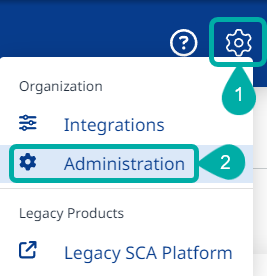
Navigate to the Administration page using the cogwheel button at the upper-right corner of the UI:
-
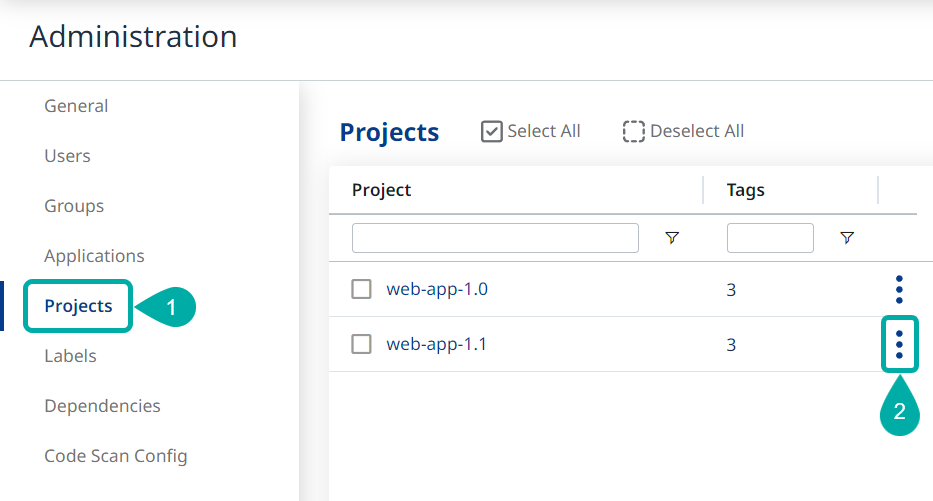
In the Administration page, select Projects and then click the Actions button (

-
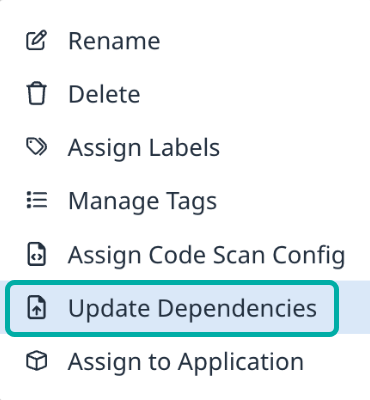
Select Update Dependencies:
-
User Drag and Drop or browse your file system for the desired SBOM file and click OK to upload it.
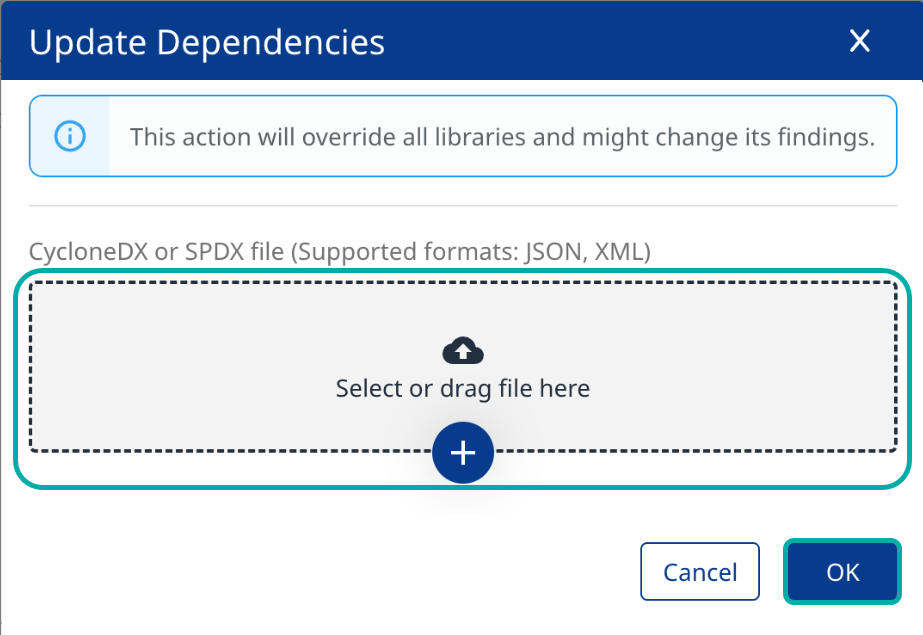
Note: The SBOM import will override the project’s existing inventory and might change its findings.
Upload an SBOM File to Update your Project via API
-
Use this API to upload a single SBOM file to update an existing project.
-
Use this API to update an application, creating a new project.
Containers
-
POST /api/v3.0/projects/{projectUuid}/containers/importSbom— update existing Container project. -
POST /api/v3.0/applications/{applicationUuid}/containers/projects/importSbom— create Container project under application.
Note:
-
For Dependencies, supported file formats include XML and JSON.
-
For Containers, the only supported file format is JSON.
Track and Troubleshoot your SBOM Import
While the import is taking place, you can track its progress via Administration → Projects → Scans → Details.
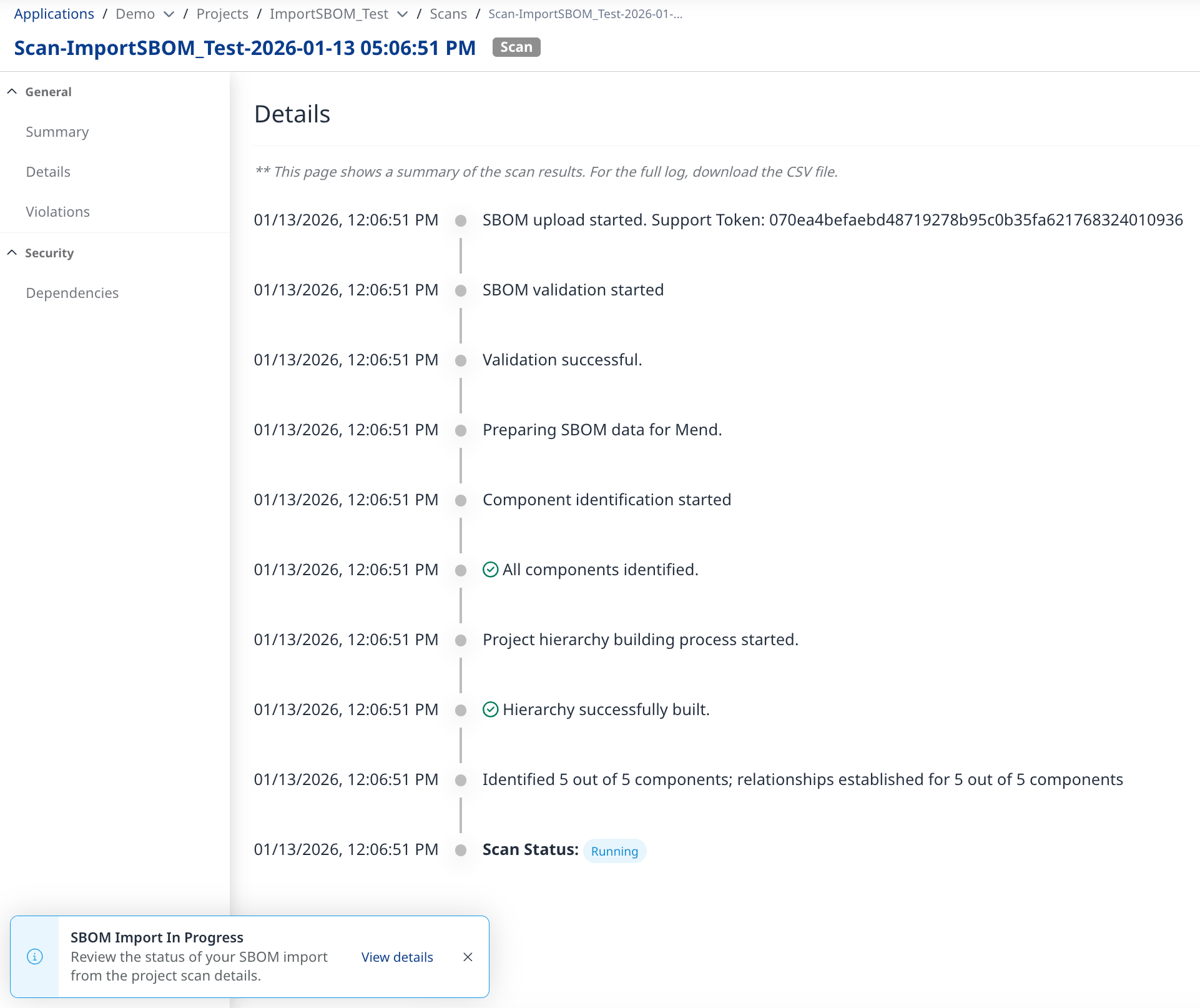
At the end of the import, the Details page will become exportable to .CSV.
This is useful for investigating warning/error messages, which often lead to partial/failed imports.
Example:
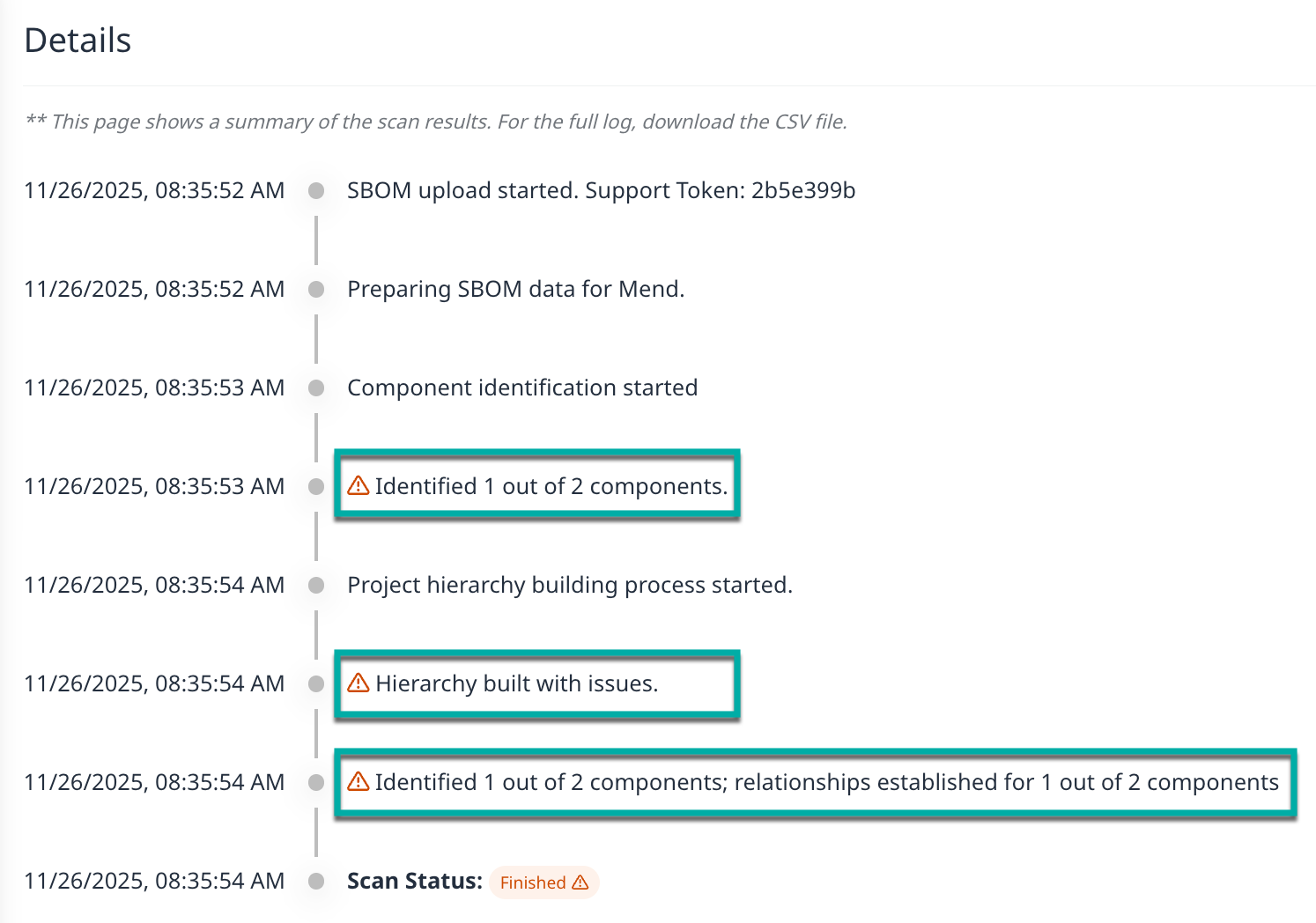
Additional information pertaining to the warnings will be available within the exported .CSV (available for Dependnecies import only).
Limitations
-
No vulnerability/VEX data in the SBOM file gets imported. Vulnerability information in the newly created/updated project is based on the Mend.io database.
-
No licensing data in the SBOM file gets imported. Licensing information in the newly created/updated project is based on the Mend.io database.
-
Keywords support limitations:
-
For SPDX, Mend.io supports the properties below:
"DEPENDS_ON", "DYNAMIC_LINK", "STATIC_LINK", "CONTAINS", "DESCRIBE" -
For CycloneDX, Mend.io supports the “dependsOn” property.
Example:"ref": "pkg:maven/com.google.apis/google-api-services-ml@v1-rev20210212-1.31.0?type=jar", "dependsOn": [ "pkg:maven/com.google.api-client/google-api-client@1.31.1?type=jar" ]
-