.svg)
Note: This feature is only available with a Mend AI Core or Mend AI Premium subscription.
Overview
This feature brings academic research on AI model vulnerabilities directly into your AI Models table. Here’s what you get and why it matters:
-
Immediate Security Context: See at a glance which AI models in your environment have known vulnerabilities, based on the latest academic research.
-
Aggregated Risk Indicators: Each model displays a count of findings, with severity indicators, so you can quickly spot high-risk models.
-
Detailed Vulnerability Insights: For each finding, you’ll see:
-
Vulnerability classification
-
Attack type and affected models
-
Vulnerability score and severity.
-
References to research papers and academic sources
-
Technical details, attack vectors, and mitigation advice
-
-
Actionable Recommendations: Each finding includes remediation steps, helping you proactively secure your AI infrastructure.
-
No More Context Switching: All this information is available right where you already manage your AI models—no need to jump between different tools or interfaces.
Why it’s valuable:
You can assess and address AI model risks faster, make informed security decisions, and stay ahead of emerging threats—without leaving your familiar workflow.
Getting it done
Step 1: Open the AI Models Table
-
Navigate to the AI Models section in your product dashboard.
Step 2: Review Security Findings at a Glance
-
In the table, each model now displays an aggregated count of security findings, with severity icons (e.g., red for critical, yellow for moderate).
Step 3: Dive Deeper with the Side Panel
-
Click on any model row to open its side panel.
-
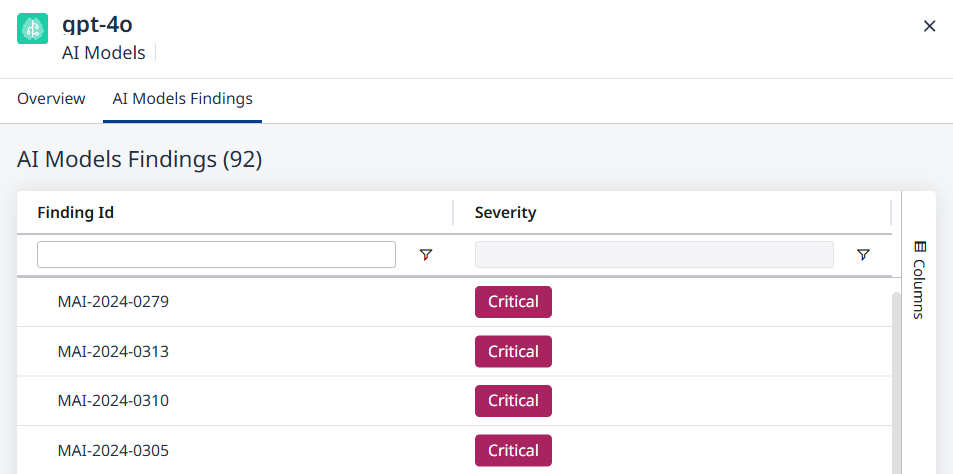
You’ll see a new AI Models Findings tab. Click it to view a list of all academic findings associated with that model.
Step 4: Explore Detailed Information
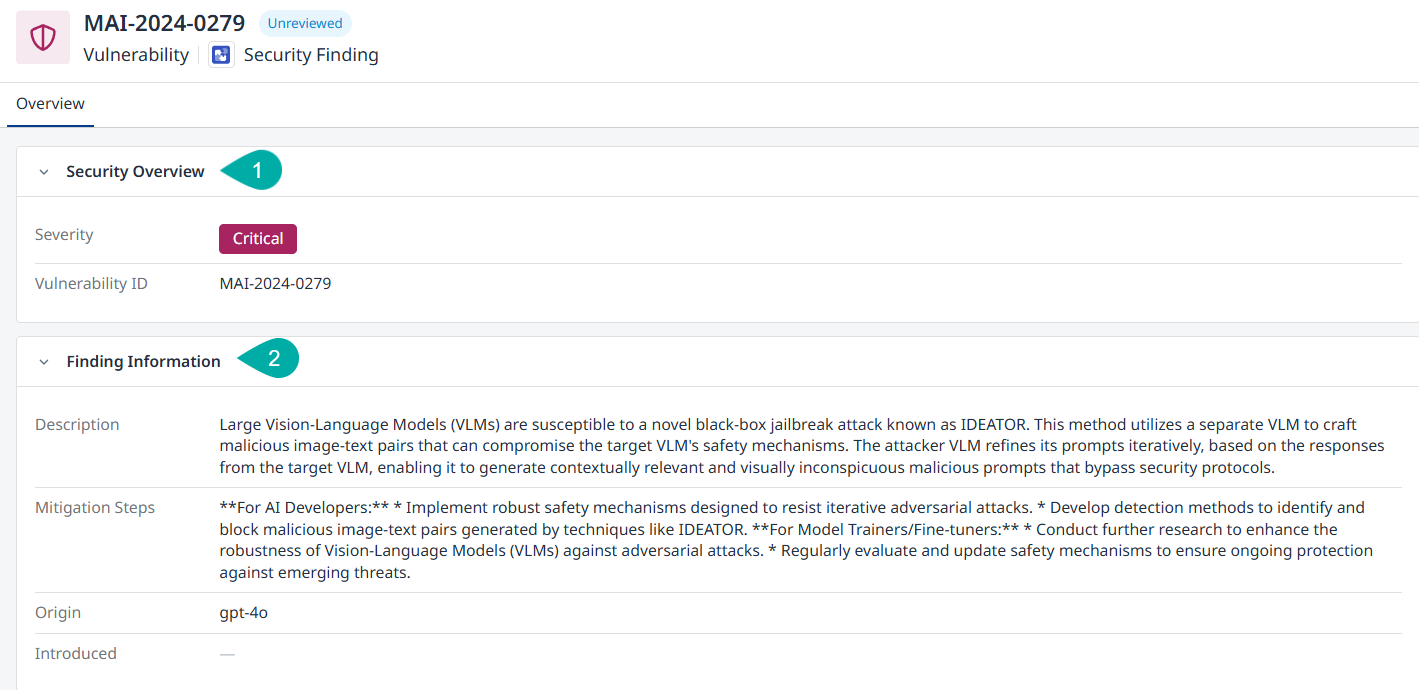
Click on any finding in the list to open a detailed view.
Here you’ll find:
-
Security Overview - Contains the severity and ID of the vulnerability.
-
Finding Information - Contains the description and mitigation steps, based on the academic papers.
-
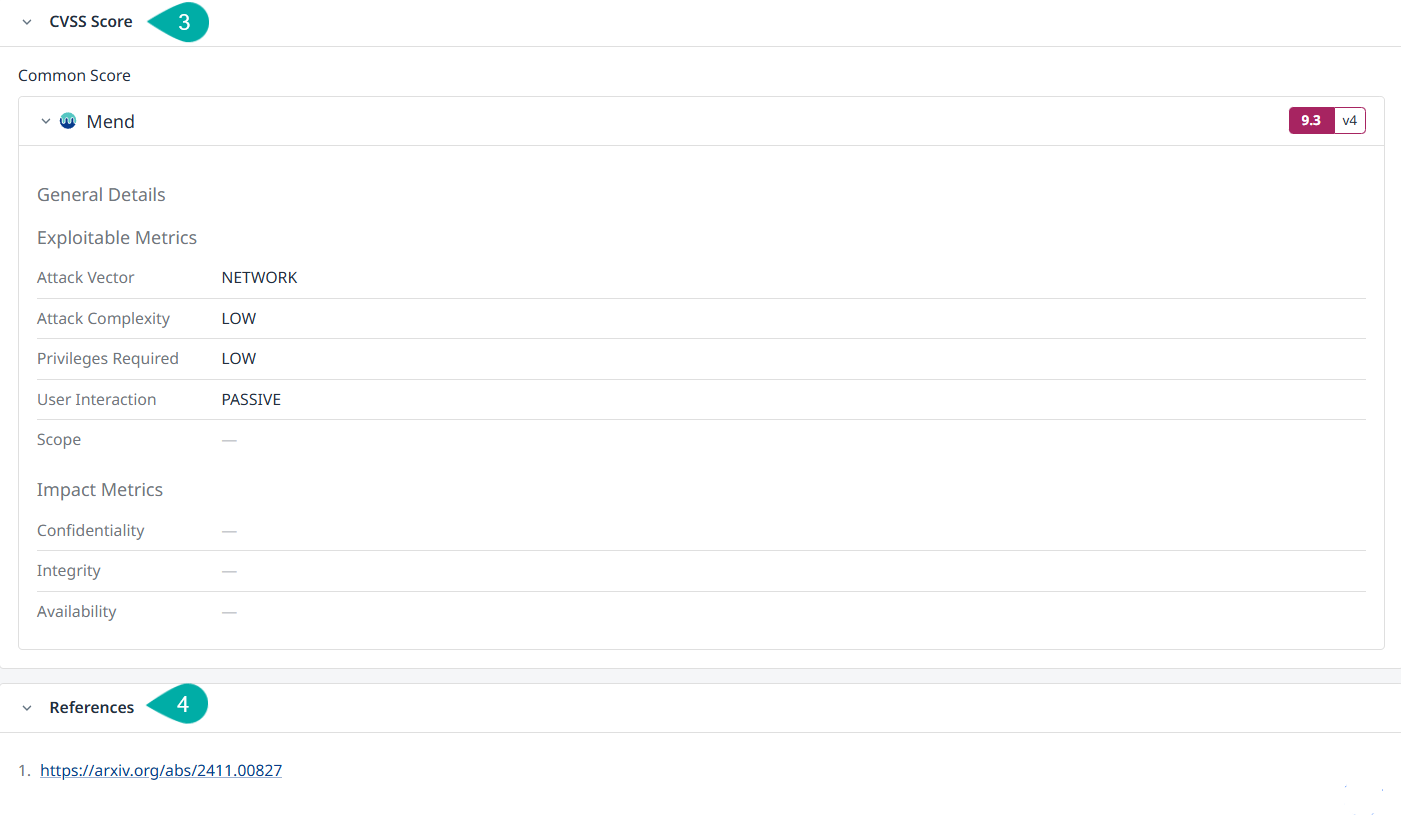
CVSS Score - Contains information about the vulnerability classification and attack vectors.
Note: CVSS scores for ML models are determined using a hybrid approach combining LLM-based assessment with manual supervision by Mend AI analysts. The scoring process was initially set up using CVSS 4.0 framework, later converted to CVSS 3.x. -
References - Contains links to the academic research papers.
Step 5: Take Action
-
Use the provided recommendations to address vulnerabilities.
-
Reference the academic sources for deeper understanding or compliance documentation.
Step 6: Stay Updated
-
As new security findings are published, the table and findings tab will update automatically—no manual refresh needed.
Limitations & Notes
-
Data Migration & Rescanning: Findings are based on the current scan of your environment. If you migrate data or rescan, findings may update or change.
-
Academic Source Scope: Currently, findings are based on academic research papers. Future updates may include additional sources.
-
Academic Security findings currently cannot be used in Automation Workflows.
-
Research papers don't always provide specific action items to mitigate risks.
Expect Mend AI to continuously update and improve the information about mitigation and mitigation steps.